Build a Mac cloud with FluxVM
A Mac cloud is a shelf of Mac minis and Mac Studios that answers as one VM API: macOS guests for Xcode CI, Linux VMs, agent
sandboxes and container VMs, each placed on the Mac that fits. Every Mac runs FluxVM's vz backend on Apple's
Virtualization.framework; one fleet registry places requests across them.
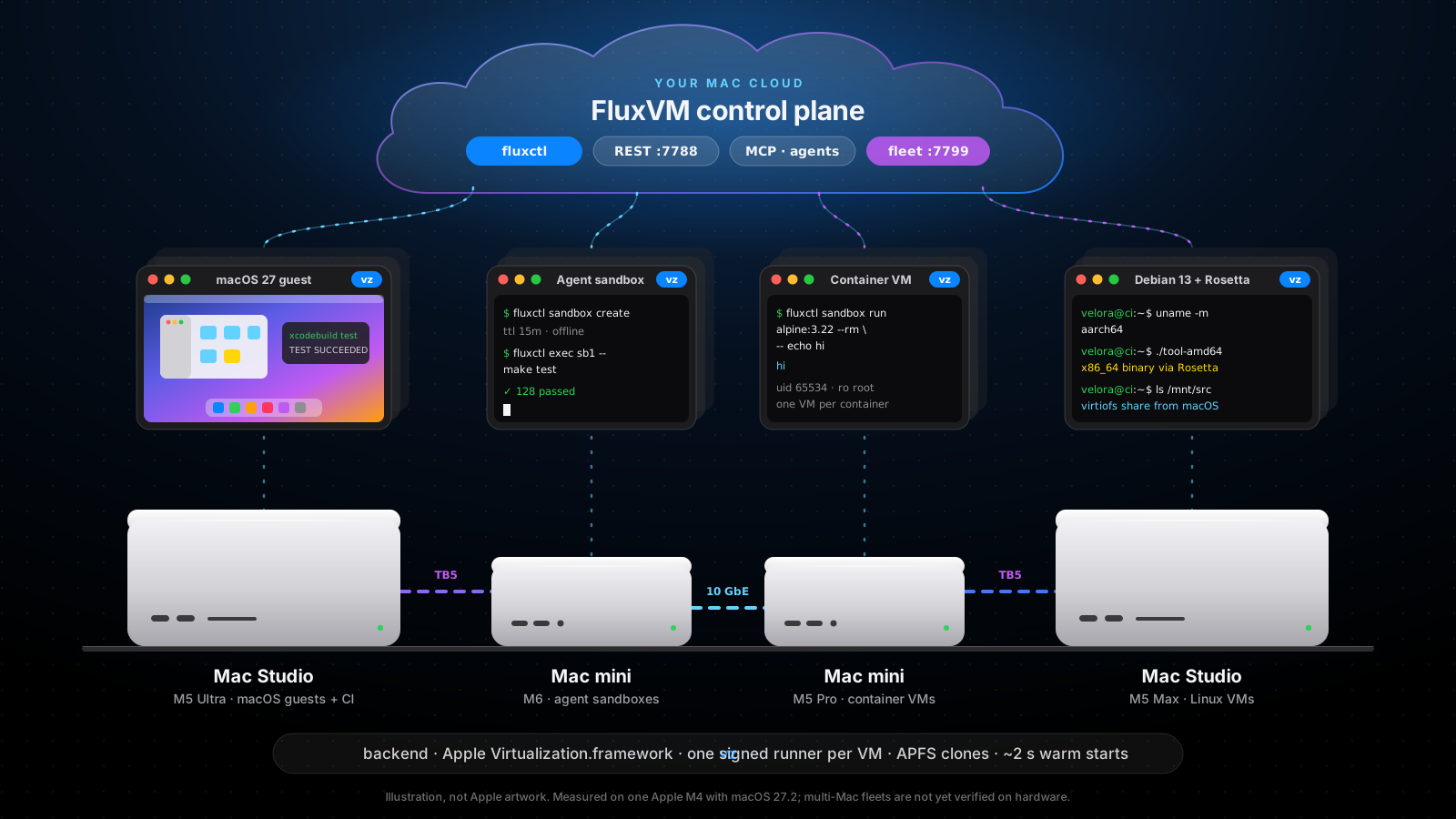
Illustration. Everything marked verified on this page ran on one Apple M4 with macOS 27.2; a fleet of several real Macs has not been run yet (see Limits).
For one Mac, start with macos.md. For how the backend works inside, see macos-architecture.md; for the private-inference cluster with Velora and Kairon, see macos-cluster.md.
Pick the Macs
| Mac | Good for | Notes |
|---|---|---|
| Mac mini (M6, up to 32 GB) | Agent sandboxes, small Linux VMs, a home lab | Quiet and always on. Measured on a 16 GB M4 mini: 205 to 788 MiB resident per idle sandbox, so plan on about 800 MiB each (agent-density.md) |
| Mac mini (M5 Pro, up to 64 GB) | Container VMs, CI runners, one macOS template | 10 GbE option; room for a macOS guest next to Linux work |
| Mac Studio (M5 Max, up to 128 GB) | Team CI, many sandboxes, macOS guests | 10 GbE and Thunderbolt 5; sandbox memory was measured on a 16 GB mini only, so Studio counts are not quoted |
| Mac Studio (M5 Ultra, up to 512 GB) | macOS guests next to large models | Unified memory is shared by macOS, models and every guest |
Capacity figures are estimates, not measurements. scripts/bench-macos-pool.sh measures macOS warm-pool checkout and return latency and runner memory on a real Mac; record the model and macOS build with any numbers you publish. FluxVM does not cap guest memory on a Mac, so size for the sum of macOS, your
models and every guest. Apple allows two macOS guests running at once per Mac: add Macs to add macOS CI lanes.
Network
- 10 GbE for management, the fleet registry and VM traffic between Macs.
- Thunderbolt 5 between Mac Studios is for model traffic when one model is sharded across Macs (roadmap, not a FluxVM feature).
- Guests sit behind each Mac's NAT. Reach them through TCP
forwardson the Mac, or put them on the LAN with theapple.bridge_interfaceMac Studio option (implemented, not yet verified on hardware; see macos.md).
Run it as a service
Warm slots and snapshot restore need an unlocked login session, so on a headless Mac the daemon runs as a LaunchAgent of a logged-in user, not a system LaunchDaemon (deploy/launchd-notes.md):
- Create a dedicated user (for example
fluxvm) and turn on automatic login for it. - Turn off the screen lock for that user and keep the display awake (or attach a display emulator). Screen Sharing works for maintenance.
- As that user:
fluxctl --config ~/.config/fluxvm/fluxvm.toml service install   # writes and loads ~/Library/LaunchAgents/dev.zyvor.fluxvm.plist
fluxctl service status                                         # loaded? PID?
With the Homebrew package (built from each version tag; the tap is not published yet, see
packaging/homebrew), brew services start fluxvm installs an equivalent LaunchAgent.
Keep VM templates and VM state on the same APFS volume so clones stay instant (cp -c); a clone across volumes is a full copy.
Join the fleet
One registry for the whole fleet, on any Mac or Linux host:
fluxvm-agent central --listen 0.0.0.0:7799
On every Mac, next to fluxctl serve:
fluxvm-agent node --name studio-1 \
  --central http://fleet-registry:7799 \
  --advertise-url http://studio-1.local:7788 \
  --label chip=m5-max --label memory-gib=128
Every 10 s the node reports free CPU and memory, its VM count, its macOS guest count and the Mac's Virtualization.framework
capabilities (fluxvm-vz-runner host-capabilities: macOS version, nested virtualization, vmnet, custom Virtio, bridged interfaces).
Then ask the fleet, not a Mac:
curl -X POST http://fleet-registry:7799/fleet/vms -H 'Content-Type: application/json' \
  -d '{"name": "ci-1", "backend": "vz", "image": "debian-13", "vcpus": 2, "memory_mib": 2048}'
curl http://fleet-registry:7799/fleet/vms          # every VM on every Mac, tagged with its node
For backend: vz the registry uses the Apple scorer (fluxvm_scheduler::apple_placement): a Mac is skipped if it lacks the free
CPU or memory, a requested feature (nested virtualization, vmnet, custom Virtio, a named bridge), or already runs two macOS guests;
among the Macs that fit, the tightest fit wins, so small VMs pack onto busy Macs and big Macs stay free for big VMs. A Mac that already holds the requested image is preferred, and each Mac advertises memory after macOS's own headroom (the larger of 3 GiB and a quarter). Details, the rebalance dry run and fleet-wide macOS pool checkout: macos-cluster.md. Stacks use the
same registry: fluxctl up --fleet http://fleet-registry:7799 (macos-stacks.md).
What to run on it
| Workload | How | Docs |
|---|---|---|
| Xcode CI on macOS guests | Prepare a macOS template once (FileVault off, Remote Login on, your key installed), clone it per job with APFS, run xcodebuild over SSH, delete it | macos.md |
| Agent sandboxes | POST /v1/sandboxes or MCP (fluxctl mcp serve --allow-write): TTL, offline or allow-listed egress, changesets, warm pool (about 2 s) | macos-sandboxes.md |
| Container VMs | fluxctl sandbox run alpine:3.22 --rm -- echo hi: one VM per container, read-only root, uid 65534; linux/amd64 images run under Rosetta | oci-sandboxes.md |
| Dev environments | A fluxvm.toml with a database, an app and a test runner; fluxctl up --fleet | macos-stacks.md |
| GUI automation | Screenshots, keyboard and mouse for any vz guest (fluxctl screenshot, fluxctl input, MCP vm_screenshot / vm_input), with Keychain-stored sign-in (fluxctl signin) | macos.md |
Running it for several teams
- mac-cloud-tenancy.md: tenants and tokens, 24-hour Mac host leases (the macOS licence's
leasing rule), quotas, scrub, drain and usage metering in
fluxvm-agent central. - SSH and port tunnels:
fluxctl fleet ssh <vm>andport-forwardthrough central, so tenants never need a route to the Macs. - vm-images.md: push a golden macOS template or Linux disk to an OCI registry once, pull it on every Mac.
- github-actions-runners.md: one fresh VM per queued GitHub Actions job.
- cross-mac-networks.md: one private network spanning several Macs (encrypted overlay).
- mac-cloud-tenancy.md#volumes: persistent volumes, disks that outlive VMs (Linux guests).
- fleet-ha.md: run two or three registries against one Redis, so the fleet survives losing one.
- fleet-metrics.md: CPU, memory, disk and network graphs per VM and per Mac,
fluxctl fleet top, and a Prometheus endpoint (GET /metrics, with a scrape-only--metrics-token). - mac-cloud-tenancy.md: console sign-in with your identity provider (OIDC), and team members with viewer, member, admin and owner roles.
- warm-pools.md: VMs booted ahead of time, so launches (macOS CI jobs above all) start in seconds.
- mac-cloud-billing.md: self-service sign-up, Stripe invoices and payment methods.
- fleet-sdk.md: Go, Python and TypeScript clients, the OpenAPI description
(
schemas/fleet-openapi.yaml) and the Terraform provider (terraform-provider-fluxvm). - mac-cloud-operations.md: running central in production: every flag, what it keeps on disk, what it exposes, a pre-launch checklist.
- fluxctl-fleet.md: every
fluxctl fleetcommand, generated from the binary's own--help. - fleet-quickstart.md: run the whole cloud on one laptop with simulated Macs (
scripts/fleet-sim.sh). - macos-signing.md: Developer ID signing, which vmnet, bridged networking and USB passthrough need.
Things Mac users will like
- Rosetta in Linux guests:
apple.rosetta: trueruns x86_64 Linux binaries in arm64 guests. - Shared folders:
fluxctl run -v ~/src:/mnt/srckeeps your editor on macOS while builds run in Linux (virtiofs). - Keychain: guest passwords for
fluxctl signinlive in your login Keychain, never in the API. - Retina displays: guest displays up to 5120 x 2880 at 220 ppi, with audio.
- APFS clones: disks and snapshots are copy-on-write; a throwaway VM costs almost nothing until it writes.
Through the fleet, a tenant snapshots a VM (disk, or disk and memory), restores it and clones it from the console or
fluxctl fleet snapshot|restore|clone(mac-cloud-tenancy.md). - launchd:
fluxctl service install,statusanduninstall.
Limits
- Verified on one Apple M4 with macOS 27.2: Linux VMs, agent and container sandboxes, snapshots, stacks, devices (macos.md).
- Verified on loopback only:
vzplacement influxvm-agent central, with one real Mac and simulated nodes. No second Mac has been used. - Verified by hand only: installing a macOS guest from an IPSW, cloning it and reaching it over SSH.
- Not verified: multi-Mac fleets on real hardware, Thunderbolt RDMA, the shared vmnet broker, physical USB passthrough, Intel Macs.
- Snapshot restore fails while the Mac's screen is locked.
The hardware drawings are original illustrations for this project, not Apple artwork. Mac, Mac mini, Mac Studio and macOS are trademarks of Apple Inc.