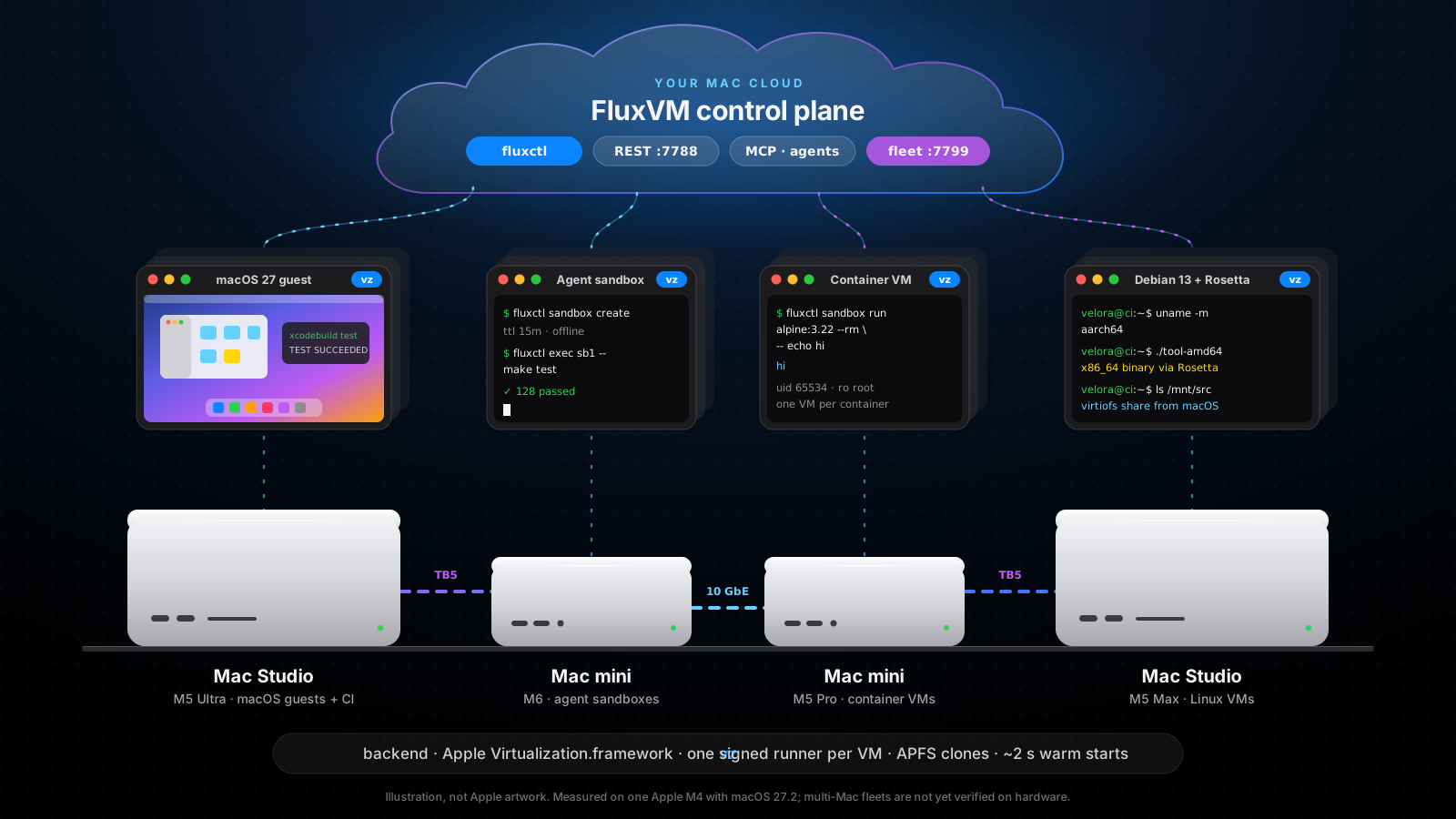
Measured, not promised
Fast enough to be disposable
A saved VM state restores in about two seconds, so an agent can have a clean machine for every task instead of sharing one.
All figures were measured on one Apple M4 with macOS 27.2. Your Mac, disk and image will differ. See where each number comes from.
Built for Mac people
Feels like it belongs on your Mac
FluxVM uses the parts of macOS you already trust: Virtualization.framework, APFS, the Keychain, launchd and Rosetta.
Apple silicon native
Daemon, API, fluxctl and a Swift runner built for arm64. No QEMU, no emulation, no Linux VM in the middle.
Rosetta in Linux guests
Run x86_64 Linux binaries and linux/amd64 container images inside arm64 guests through Apple's Rosetta share.
Keychain sign-in
fluxctl signin keeps a guest password in your login Keychain and types it into the display. It is never returned by the API.
APFS clones
Disks and snapshots are copy-on-write clones (cp -c). A throwaway VM costs almost no disk until it writes.
Shared folders
Edit in your favourite macOS editor; build in Linux. virtiofs shares, read-only enforced by the host: fluxctl run -v ~/src:/mnt/src.
Retina displays
Guest displays up to 5120 x 2880 at 220 ppi, audio out, and a window that follows your resize.
launchd, not cron
fluxctl service install writes a LaunchAgent, so a headless Mac mini serves VMs after every reboot.
Agents can see the screen
Screenshots, keyboard and mouse for any vz guest, without Screen Recording or Accessibility permission on the host.
vz and macOS virtualization
Apple's hypervisor. FluxVM's API.
The vz backend drives Apple's Virtualization.framework, the same hypervisor behind macOS's own virtual machines. On a Mac, "backend": "auto" resolves to vz.
fluxctlREST :7788MCPPython / Go / TS SDKsfluxctl servewarm poolAPFS clonesegress proxy over vsockfluxvm-vz-runnersigned with com.apple.security.virtualization, one process per guestVirtualization.frameworkHypervisor.frameworkApple siliconmacOS guest
IPSW install, macOS boot loader
A real macOS userspace for Xcode, signing and UI tests. Prepare a template once, then clone it with APFS in an instant; every clone gets its own machine identity.
Verified by hand on M4Linux VM
EFI from disk, or direct kernel
Debian 13, Debian 12 and Ubuntu 24.04 ARM64 from named images, with cloud-init, port forwards, shared folders, snapshots and the vsock guest agent.
Verified on M4Container VM
Direct kernel, read-only root
An OCI image in its own lightweight VM: uid 65534, no SSH, agent-only exec, a digest-verified rootfs cache and a warm pool.
Core verified on M4Apple's licence allows two macOS guests running at once per Mac; the fleet scheduler respects it. Snapshot restore needs an unlocked login session. Full architecture →
Not a mockup
A real guest, on a real Mac
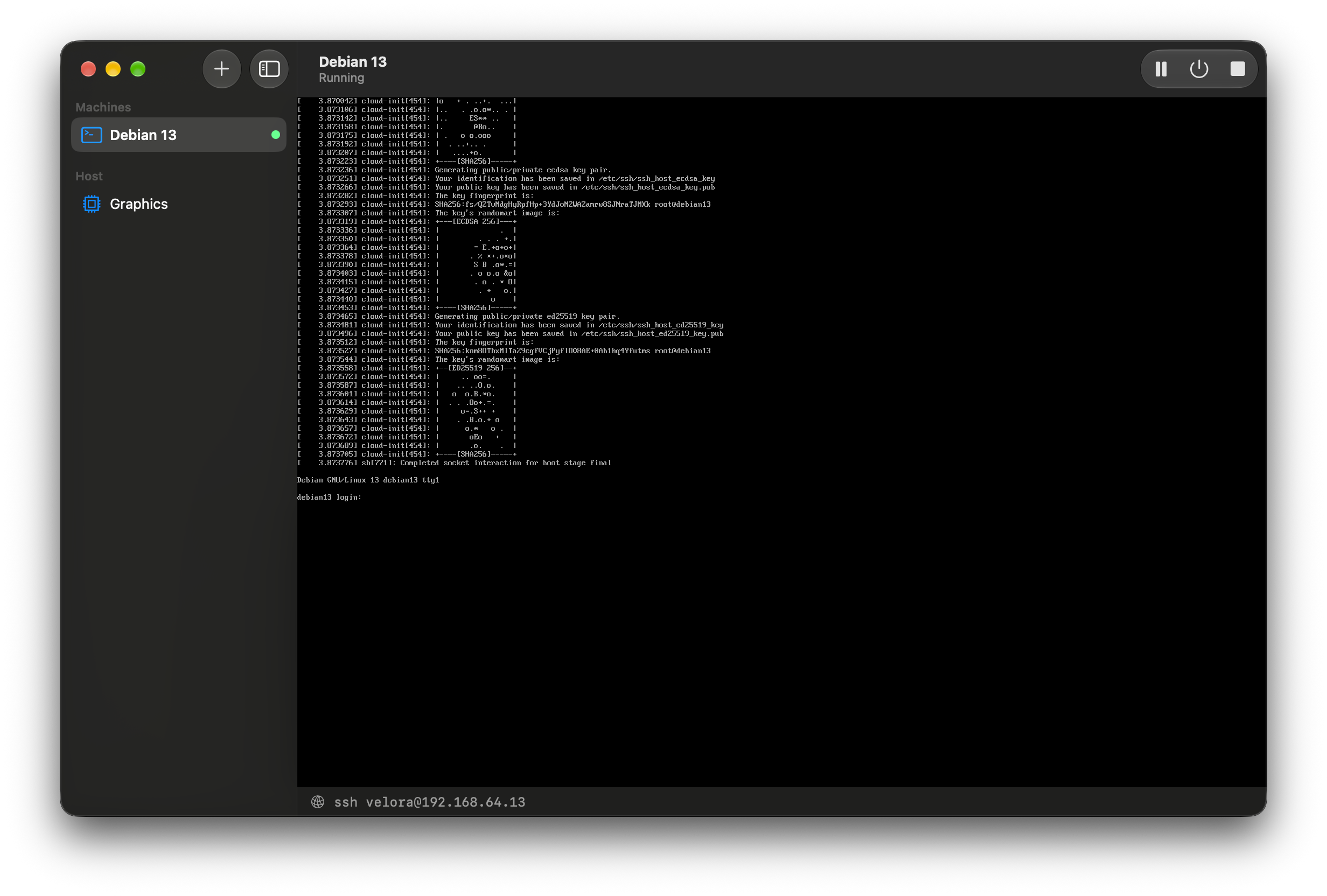
A Debian 13 guest on an Apple M4 with macOS 27, shown in Velora's app.
What you can run
One API for every kind of machine
Every row is the same REST API, the same fluxctl and the same MCP server that FluxVM uses on Linux. Each tag says what has and has not run on real hardware.
Linux VMs
Debian and Ubuntu ARM64 guests from named images, with cloud-init, port forwards, shared folders, snapshots and `fluxctl run` throwaway shells.
Verified on M4Agent sandboxes
Disposable machines for coding agents: TTL, exec and files, offline sandboxes you can fork into four running copies in about 4 s, host Metal/MLX via host_gpu with no network card, and a warm pool.
Verified on M4Container sandboxes
Run an OCI image as its own VM, one container per VM, with a digest-verified rootfs cache and its own warm pool.
Core verified on M4macOS guests
Clone a prepared macOS template for clean-room testing and CI. Apple allows two macOS VMs running at once per Mac.
Verified by handStacks
Describe a database, an app and a test runner in one `fluxvm.toml` and bring them up with `fluxctl up`, with discovery by name.
Verified on M4Mac Studio options
Multiple displays, bridged networking, per-VM vmnet networks, memory balloon, USB, ASIF overlay disks, macOS 27 provisioning.
Implemented, mostly not yet hardware-verifiedHow it works
The daemon never touches the hypervisor
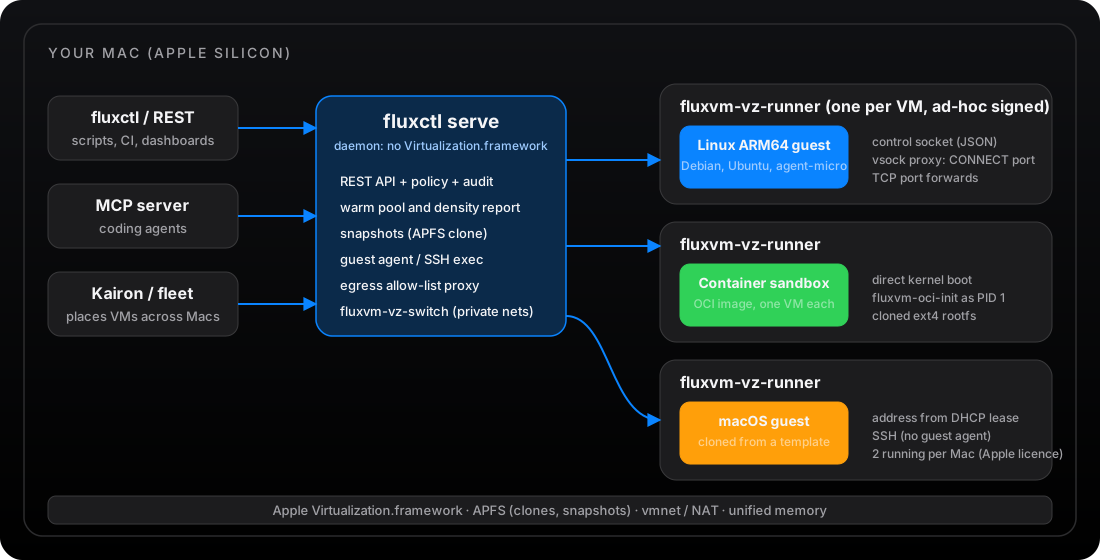
FluxVM starts one small signed helper, fluxvm-vz-runner, for every VM. The runner owns the guest and talks to the daemon over a control socket and a vsock proxy. A crash in one guest cannot take the daemon or another VM with it.
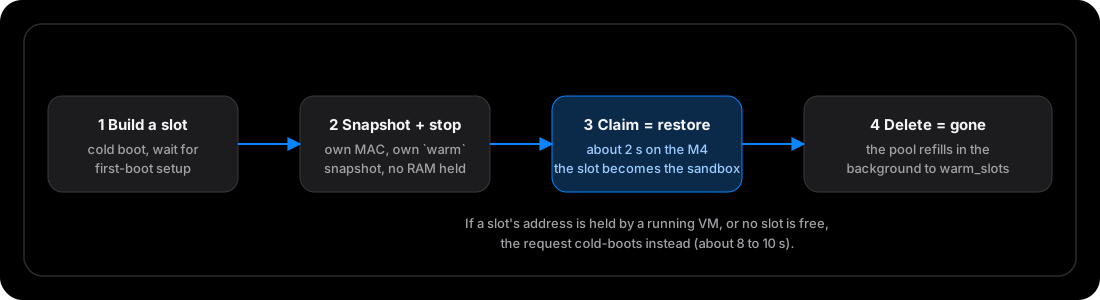
Warm pool
Each warm slot is a stopped VM with its own MAC address and its own snapshot. A new sandbox restores one in about two seconds instead of booting.
APFS clones
Disks and snapshots are copy-on-write clones on the Mac's own file system, so a throwaway VM costs almost no disk until it writes.
vsock, not the network
The guest agent, the egress allow-list and offline sandboxes all use vsock, so a sandbox with no network card can still run commands and move files.
Choose your Mac
From a Mac mini to a Mac Studio cluster
Unified memory is the budget: it is shared by macOS, your models and every guest. FluxVM does not enforce guest memory on a Mac, so size for the sum.
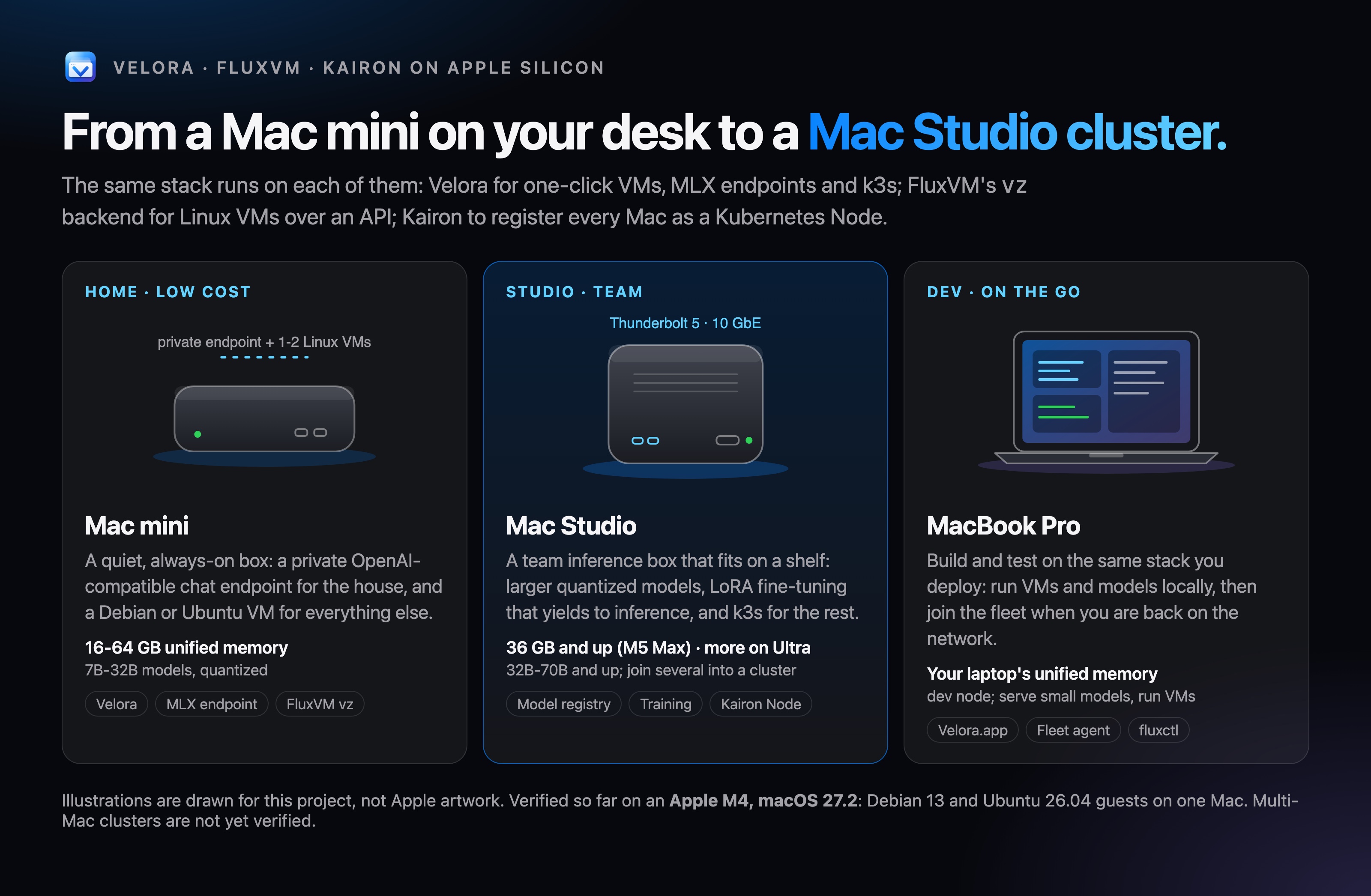
What Apple ships
M5 Max (up to 128 GB) or M5 Ultra (up to 512 GB, the 512 GB option ships late October). Four Thunderbolt 5 ports (six on M5 Ultra), 10 GbE.
What it means for FluxVM
The team host: CI runners, many agent sandboxes and macOS guests next to large models in unified memory. Sandbox memory was measured on a 16 GB mini only, so no count is quoted for this size. 10 GbE and Thunderbolt 5 suit a fleet; multi-Mac clusters are not yet verified.
Chips, memory and ports are Apple's figures, read from Mac mini, Mac Studio and MacBook Pro specs on 2026-10-10. Capacity guidance is an estimate, not a measurement; FluxVM has only been run on an Apple M4.
Install
From zero to a VM in a minute
$ xcode-select --install$ brew install hivex$ git clone https://github.com/zyvorai/zyvor-fluxvm && cd zyvor-fluxvm$ cargo build -p fluxctl$ ./scripts/macos-live-test.sh # boots Debian 13 through the API
Needs Xcode 27 for the Swift runner. The build signs the runner for you.
New Macs, new macOS
What macOS 27 adds for virtual machines
The newest Macs ship with macOS 27. Apple's Virtualization.framework gained features that FluxVM already has hooks for. They are the reason to run the newest OS on a build host.
Layered disk images
DiskImageKit stacks a read-only base, an ASIF cache and a copy-on-write overlay. FluxVM already has an ASIF overlay option for fast throwaway disks.
Implemented, not yet hardware-verifiedUnattended macOS guests
Guest provisioning can skip Setup Assistant and create a user, so a macOS template needs no clicking. FluxVM exposes it as provision options.
Implemented, not yet hardware-verifiedCustom Virtio devices
A vendor Virtio device with a host-side provider and a guest driver. Ping, echo, stats, capabilities and bulk fill, zero, copy and CRC through guest memory work on a Debian 13 guest.
Verified on M4 (control plane and bulk operations)Shared vmnet networks and physical USB
VMs that name one vmnet network share it through a broker, and a physical USB device can be passed through with Accessory Access. Both need signing this Mac did not allow.
Implemented, blocked on this host by signing; not verifiedFrom Apple's WWDC26 session Expand the capabilities of your Virtualization app. Nested virtualization is documented to need an M3 or later and macOS 15; we have not verified it on hardware.
What we have and have not verified
- Everything marked verified ran on one Apple M4 with macOS 27.2. Multi-Mac clusters and Thunderbolt model sharding have not been run.
- A sandbox with a network card sits on an unfiltered NAT. Only offline and allow-listed sandboxes are isolated from the network.
- Mac Studio options (displays, bridging, vmnet, balloon, ASIF, provisioning) are implemented but mostly not yet verified on hardware. The custom Virtio guest bus (control and bulk), host capabilities and fleet placement are the exceptions; the vmnet broker and physical USB are not verified.
- The fleet registry places
vzrequests with the Apple scorer, using the capabilities each node reports. It was checked on one Mac plus simulated nodes; no second Mac has been used. - The published package installs from the tap, and its service, upgrade and uninstall were run on the M4. Self-service sign-up and Stripe in the fleet central are off by default; sign-up confirms the address by a mailed link and cannot be opened without a mail webhook.
Try it on the Mac you have
Build fluxctl, run fluxctl serve, and create your first VM or sandbox through the API.