What people build
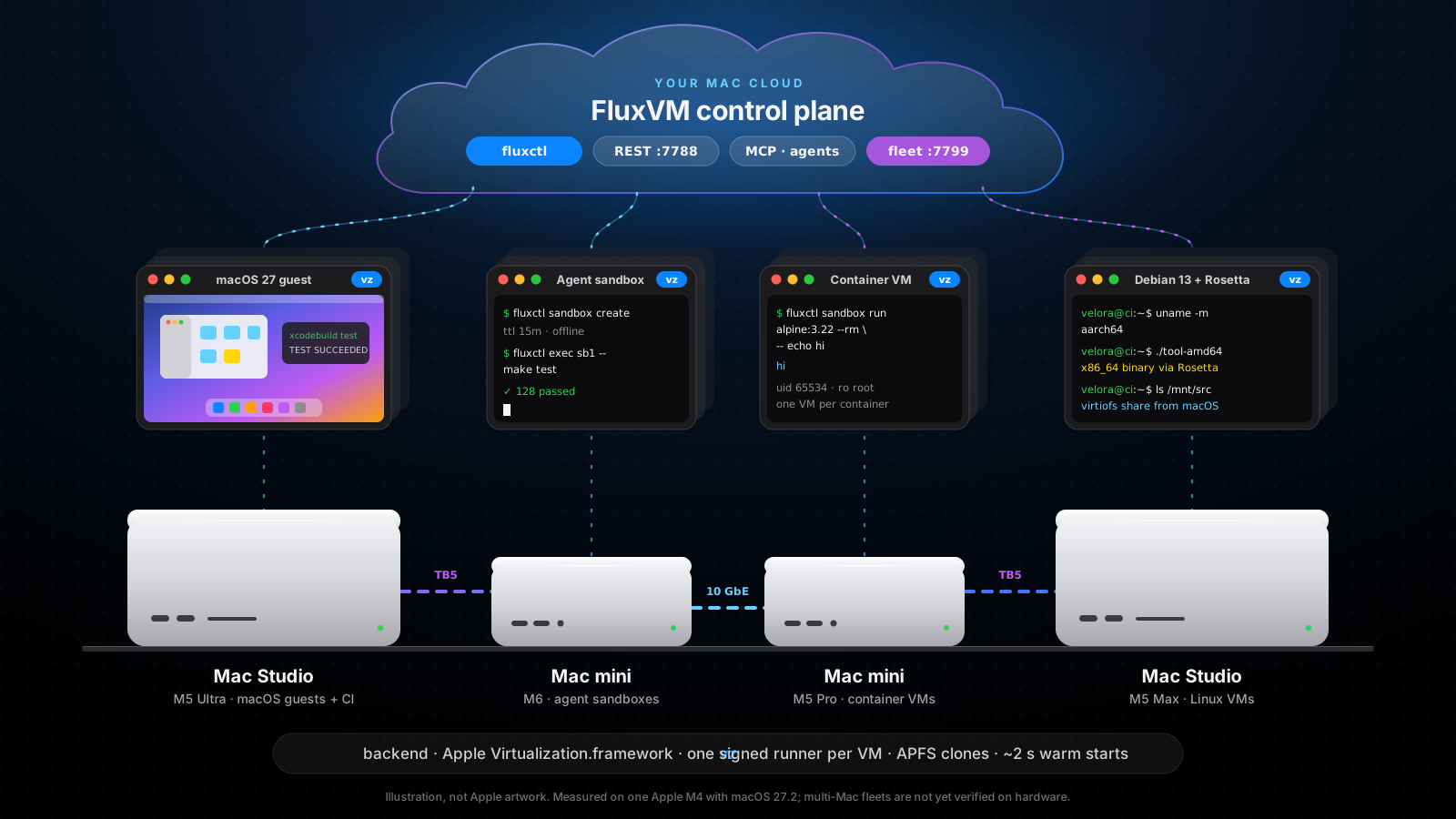
One fleet, every kind of machine
Xcode CI on macOS guests
Clone a prepared macOS template per job with APFS, run xcodebuild over SSH, throw it away. Two macOS guests per Mac, so add Macs to add lanes.
An agent farm
Disposable Linux sandboxes for coding agents through MCP: offline or allow-listed, forked into running copies in about 4 s, with a warm pool that restores in about 2 s.
Containers, each in a VM
OCI images as lightweight VMs with a read-only root and uid 65534. linux/amd64 images run under Rosetta.
Dev boxes for the team
Describe a database, an app and a test runner in fluxvm.toml; fluxctl up --fleet picks the Mac that fits.
What your team gets
A cloud, not a shelf
Tenants and leases, snapshots, volumes, tunnels, graphs and a console, in one API. Each card says what it has actually been run against.
Mac leases and tenants
A tenant rents a whole, empty Mac for at least 24 hours (Apple’s licence rule), with quotas, scrub-on-release and drain.
Tested against simulated MacsSnapshots and clones
Save a VM with or without memory, roll back while it runs, and clone it into a new VM under the same quota.
Tested against simulated MacsPersistent volumes
Disks that outlive a VM. A VM that uses one is placed on its Mac, and two VMs never share one.
Tested against simulated MacsSSH without exposing the Mac
fluxctl fleet ssh and port-forward go through central, so tenants never need a route to a Mac.
Tested against simulated MacsWarm pools
Booted VMs waiting, so a CI job starts in seconds; the pool boots a replacement after each claim.
Tested against simulated MacsGraphs and Prometheus
CPU, memory and disk per VM and per Mac, fluxctl fleet top, and a /metrics endpoint with a scrape-only token.
Tested against simulated MacsSSO and roles
Console sign-in through your OIDC provider, with viewer, member, admin and owner roles.
Implemented; no real identity provider runPrices, statements, budgets
A price list, monthly statements per tenant (CSV too), budgets that warn at 80%, and signed webhooks.
Tested against simulated MacsGo, Python, TypeScript, Terraform
Typed clients for the fleet API, an OpenAPI description and a Terraform provider.
Tested against fakesFour steps
From a shelf of Macs to a team’s cloud
Run FluxVM on every Mac
The daemon as a service in a logged-in session, so warm starts and snapshot restore survive a reboot.
Start one central
The fleet registry and API. Built from source today (cargo build -p fluxvm-agent); it is not in the Homebrew package yet.
Register each Mac
Each node reports free CPU and memory, its macOS guest count and what Virtualization.framework can do there.
Give a team a tenant
A tenant gets its own token, quotas and Mac leases, and uses the fleet like one big machine.
# 1. Run FluxVM on every Mac brew install zyvorai/tap/fluxvm brew services start zyvorai/tap/fluxvm# 2. Start one central TOKEN=$(openssl rand -hex 16) fluxvm-agent central --listen 127.0.0.1:7799 --token $TOKEN \ --public-url https://cloud.example.com# 3. Register each Mac fluxvm-agent node --name studio-1 \ --central http://fleet-registry:7799 --token $TOKEN \ --advertise-url http://studio-1.local:7788# 4. Give a team a tenant fluxctl fleet --token $TOKEN tenant create acme --max-vms 8 fluxctl fleet lease create # rent a whole Mac, 24 h minimum fluxctl fleet launch --image debian-13 web-1 fluxctl fleet ssh web-1 # through central; no route to the Mac
Before you rack it
A headless Mac, done right
Stay logged in
Virtualization.framework restores saved state only in an unlocked session. Use a dedicated user with automatic login and the screen lock off.
One APFS volume
Keep templates and VM state on the same volume so clones are instant. A clone across volumes is a full copy of a 20+ GB disk.
Size for unified memory
FluxVM does not cap guest memory on a Mac. Budget macOS, your models and every guest together; the scheduler keeps headroom.
What is and is not verified
- Everything marked verified ran on one Apple M4 with macOS 27.2.
vzplacement influxvm-agent centralwas checked with one real Mac and simulated nodes. No multi-Mac fleet has run on real hardware yet.- The platform features above were run against central plus simulated Macs and covered by tests; none has run across several real Macs, against real Stripe, or with a real identity provider.
- Self-service sign-up and Stripe are off by default. Sign-up confirms the address by a mailed link and needs a mail webhook before it can be opened; shared warm pools are off for tenants unless the operator allows them: see the operations guide.
- Thunderbolt RDMA, the shared vmnet broker and physical USB passthrough are not verified.