Agent sessions
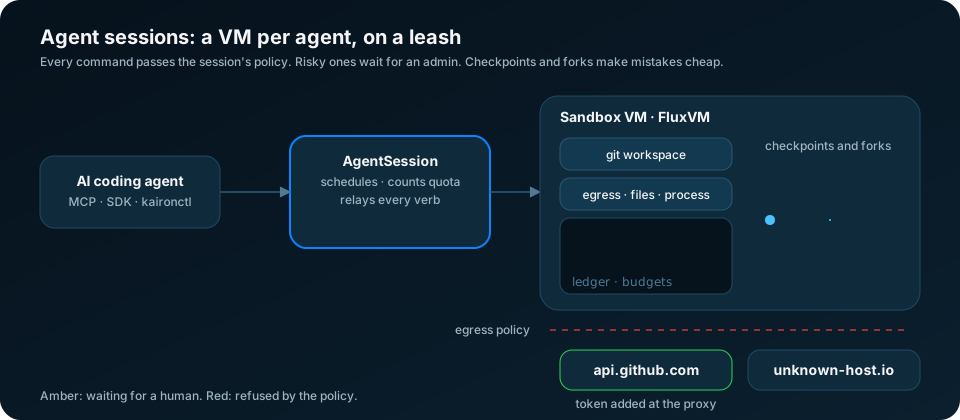
An AgentSession is one FluxVM agent session (/v1/agents/sessions): a
sandbox VM that FluxVM owns, plus a workspace, a compiled policy,
checkpoints, an event ledger, and the exec, jobs, files, git and preview
verbs on top. Kairon schedules it, counts it against quota, mirrors it into
status and relays its verbs. The VM is not a Machine. This feature is
experimental.
If you want a long-lived Machine that suspends itself when idle, use agent sandboxes instead. Use an AgentSession when an agent needs checkpoint and restore, live forks, a ledger of what it ran, or an egress policy that FluxVM compiles and enforces per session.
Requirements and limits
- FluxVM 0.4.8 or later on a Mac node. FluxVM 0.4.8 only creates
sessions with the Apple Virtualization backend. On Linux, every FluxVM
release so far refuses
POST /v1/agents/sessionswith400 sandbox create requires template or spec, and theofflinepreset and host allow-lists are also implemented only on that backend. Every 10 minutes, kairon-node probesGET /v1/agents/sessions. It labels its nodekairon.zyvor.dev/agent-sessions=truewhen the probe answers and the node is a macOS host. FluxVM on Linux answers the probe but cannot create sessions, so Linux nodes never get the label. Sessions are only placed on labelled nodes. When FluxVM can create sessions on Linux, a Kairon release has to lift this check. - No session on a node without the label. If no labelled node fits, the
session stays
Pending, andstatus.messagegives the scheduler's reason. - Verbs need kairon-ui with the console relay (
console.enabled: truein the chart). Without it, verbs return 501. A Mac node running kairon-node natively needs its console relay set up the same way.
Create one
apiVersion: kairon.zyvor.dev/v1
kind: AgentSession
metadata:
  name: fix-issue-42
spec:
  agent: codex                       # label only; FluxVM default "custom"
  workspace:
    git: https://github.com/org/repo # cloned into /workspace
    mode: clone                      # clone (default) or readonly
  resources: {cpu: "2", memory: 4Gi} # defaults 2 vCPUs, 2Gi
  image: agent-micro                 # FluxVM image; empty uses FluxVM's default
  engine: agent                      # refuse a Mac guest without FluxVM's guest agent
  policy:
    preset: developer-safe           # offline, developer-safe or open
    network:
      default: deny
      allow:
        - host: pypi.org
        - {host: api.github.com, methods: [GET], paths: ["/repos/**"]}
    filesystem: {read: ["/workspace/**"], write: ["/workspace/**"]}
    process: {deny: ["curl *", "ssh *"], ask: ["git push*"]}
  budget: {maxExecs: 500, maxChildren: 8, maxComputeSeconds: 7200}
  ttlSeconds: 7200
The same from the CLI:
kaironctl session run fix-issue-42 --agent codex --git https://github.com/org/repo \
  --preset developer-safe --network-default deny --allow-host pypi.org \
  --process-deny 'curl *' --process-ask 'git push*' --max-execs 500 --ttl 2h
kaironctl session list
kaironctl describe agentsession fix-issue-42
run waits until the session is Running (--wait 10m by default;
--no-wait returns right away). The phases are Pending (not placed yet,
or waiting for quota), Creating (kairon-node asked FluxVM; a cold create
with a git clone can take a minute), Running, Ended (FluxVM ended it,
for example at its TTL or budget) and Failed. Deleting the AgentSession
deletes the FluxVM session through the kairon.zyvor.dev/agentsession-cleanup
finalizer.
How the spec maps to FluxVM
kairon-node sends the spec to FluxVM as is: workspace, runtime (image,
cpus, memory_mb), policy, budget and ttl_seconds. kairon-ui does
not compile the policy itself. FluxVM's answer is copied into status:
status.policy.preset,offlineandallowHostsare what FluxVM compiled.status.policy.unenforcedlists the rules FluxVM accepted but cannot enforce on that node. Read it before you trust a rule. The dashboard shows it on the session panel.status.policy.enforcementandnetworkEnforcementsay how the rules are enforced (for example in the guest only, or at the host).status.capabilitiessays whether the backend supports snapshots, forks, a PTY, confinement and HTTP-level rules. On a Mac,enginesays how commands reach the guest:agent(FluxVM's guest agent: hardened exec, supervised jobs, filesystem confinement) orssh(a stock image without the agent: exec, files and the terminal work, but there is no job supervisor or confinement).supervisoris true when the guest agent has the job supervisor. The dashboard warns aboutsshsessions.
Engine. FluxVM after 0.4.8 gives sessions without image its
agent-micro image when the node's catalog has it, and the SSH engine
otherwise. spec.engine: agent (kaironctl session run --engine agent)
makes FluxVM refuse the session with 409 instead of creating it on the SSH
engine; the session goes Failed with that message. FluxVM 0.4.8 ignores
the field.
The webhook rejects invalid specs before FluxVM sees them, for example:
unknown presets or modes, git URLs that are not https://, guest paths that
are relative or contain .., filesystem rules with wildcards (only a
trailing /** is allowed), malformed hosts and HTTP methods, and budgets
that are negative or out of range. Credentials in a git URL are removed
from status and from logs.
Scheduling and quota
kairon-controller places a session the same way it places a Machine of the
same size. The scheduler sees only nodes labelled
kairon.zyvor.dev/agent-sessions=true, plus spec.placement.nodeSelector
and tolerations. Sessions reserve their CPU and memory on that node.
Every session that holds a VM (Creating or Running) counts as one
Machine of its size against the namespace's MachineQuotas. A session
that would exceed a quota stays Pending with the quota's reason.
Two kinds of session skip the controller's quota admission, but still count once they run:
- A session created with
spec.nodeNamealready set. kairon-ui refusesnodeNamefrom non-admins with 403. Anyone with RBAC to create AgentSessions directly can still set it. - The child sessions of a fork, which kairon-ui creates pinned to the
parent's node. Use
budget.maxChildrento cap them.
Verbs
Everything other than create, list, get and delete goes through kairon-ui
at /api/v1/agentsessions/{namespace}/{name}/{verb}. kairon-ui sends the
request to the node's console relay, which sends it to that node's FluxVM.
An admin can call any verb. A non-admin can call verbs only when
ui.auth.sandboxOperatorExec is on and the caller has a user name. kairon-ui
logs the verb and the HTTP method, never commands, paths or file contents.
An Ended session still answers events, artifacts and trajectory.
| Task | CLI | MCP tool |
|---|---|---|
| Run a command | session exec NAME -- CMD (exits with its code) | session_exec |
| Interactive terminal | session shell NAME [-- CMD] | |
| Guest display (Mac) | session screenshot, session input | session_screenshot, session_input |
| Background job | session bg, jobs, logs -f, kill | session_job_start, session_job_read |
| Approvals | session approvals, approve NAME ID, deny NAME ID | session_approvals (read only) |
| Files | session ls, cat/pull, put (chunked above 1 MiB), rm-file | session_read_file, session_write_file |
| Guest tools | session probe | session_probe |
| Credentials | session grant, grants, revoke-grant (admin only) | |
| Git | session git NAME status|diff|log|commit MSG|branch B | session_git, session_git_commit |
| Checkpoint | session checkpoint --tag T [--disk-only], restore T | session_checkpoint, session_restore |
| Fork | session fork --count N, promote CHILD | session_fork |
| Parallel attempts | session rollout NAME --count N -- CMD | |
| Preview URL | session expose PORT, previews, unexpose | session_preview |
| Ledger | session timeline [--trajectory], artifacts | session_trajectory |
| Export | session export --out F.jsonl or --otlp URL |
Forks. fork returns FluxVM's child sessions. kairon-ui creates one
AgentSession per child, named <parent>-<first 8 characters of the id>,
labelled kairon.zyvor.dev/forked-from=<parent> and annotated
kairon.zyvor.dev/adopt-session=<id>. kairon-node adopts the existing
FluxVM session instead of creating a new one. If kairon-ui could not
create a child, it is listed in the response's agentSessionErrors. That
child still exists in FluxVM until its TTL ends it.
Rollout. rollout forks N children from the parent's live state, runs
the command in each at the same time, prints one result per child and then
deletes them. Use --keep to keep them for inspection or promote.
Export. export writes the trajectory as JSONL: one session line, then
one step per line. With --otlp, it sends the trajectory as a single
OTLP/JSON trace to the collector's /v1/traces. The trace id is the FluxVM
session id and there is one span per step. Span ids match fluxctl's
export, so the same session exported by either tool gives the same trace.
Not relayed. FluxVM's session tokens work only on FluxVM's own port
on the node, ssh hands out the host's shared sandbox key, and
pty-ticket exists for browsers that talk to FluxVM directly. The console
relay refuses all three.
Approvals
policy.process.ask lists command patterns (same syntax as allow and
deny) that run only after a person approves them. A matching exec or
job start answers 428 with an approval id instead of running:
$ kaironctl session exec demo -- git push origin main
Error: this command needs an admin's approval (rule "git push*"); approval 6f1c... is pending until 2026-10-14T16:12:03Z
  approve: kaironctl session approve demo 6f1c...
  then repeat with --approval-id 6f1c..., or wait for the decision with --approval-wait 2m
$ kaironctl session approvals demo           # pending requests, newest first
$ kaironctl session approve demo 6f1c... --note "release branch"
$ kaironctl session exec demo --approval-id 6f1c... -- git push origin main
An approval covers that exact command once. --approval-wait (at most
2m) holds the request open until someone decides. Only admin accounts can
approve or deny, even when ui.auth.sandboxOperatorExec lets operators run
verbs, so an agent with an operator token cannot approve its own commands.
The MCP server only lists approvals. FluxVM records its own node token as
the decider, so kairon-ui writes the person into the note
(by alice via kairon-ui: release branch). The dashboard's session panel
lists pending approvals with Approve and Deny buttons for admins. After a
428 it offers to run the command again once it is approved.
Files, terminal, screen, probe and credentials
Large files. put writes files up to 1 MiB in one request. Larger
files (up to 2 GiB) go through FluxVM's resumable uploads: 4 MiB chunks, a
retry from the guest's offset after a conflict, and a SHA-256 check before
the file appears. A failed upload is aborted. The SDKs' write_file and
writeFile do the same.
Terminal. session shell opens a real terminal (a WebSocket through
kairon-ui and the console relay) that follows your window size and exits
with the shell's code. FluxVM refuses a terminal to sessions with process
or filesystem rules, because a shell would get around them, and only to
admin tokens.
Screen (Mac sessions, FluxVM after 0.4.8). session screenshot saves
the guest display as a PNG and session input sends keyboard and mouse
input to it, so an agent can drive a graphical app:
kaironctl session screenshot demo -o screen.png --max-width 1280
kaironctl session input demo click 640 400 --screen-width 1280
kaironctl session input demo type -- 'make test'
kaironctl session input demo key enter --screenshot after.png
kaironctl session input demo --actions-file steps.json   # a list of FluxVM actions, in order
Coordinates are pixels of the screenshot from the top left;
--screen-width names its width when it was scaled down. The actions are
type, key (with --mod shift|control|option|command), move, click,
double-click, right-click, middle-click, down, up, drag and
scroll. The screen takes the same grant as exec, since typing into the
console is running commands. FluxVM ledgers screenshots and input as
screen.shot and screen.input without the pixels or the typed text, and
the MCP audit log keeps only the length of session_input's text. The
MCP session_screenshot tool returns the image itself. The dashboard's
session panel shows the screen of a Mac session: click on it to click
there, or type text and press Enter.
Fork on a Mac. FluxVM after 0.4.8 clones a fork's disk and saved state
with APFS copy-on-write. The fork answer's files_cloned and
files_copied say how many files were cloned or fully copied, and
kaironctl session fork warns when any were copied (slower, real disk).
Probe. session probe lists the tools found in the guest image, its
architecture and kernel, and which session features (git, promote, ...) are
ready.
Credential grants (admin only). FluxVM's egress proxy adds a header to the session's requests to the named hosts, so the guest never holds the credential:
GH_AUTH="Bearer $(gh auth token)" kaironctl session grant demo github \
  --host api.github.com --method GET --path '/repos/*' --ttl 1h --value-env GH_AUTH
kaironctl session grants demo
kaironctl session revoke-grant demo --all
The value comes from --value-env, --value-from-secret SECRET/KEY (a
Secret in the namespace), or, with neither, the node's
FLUXVM_SECRET_<REF> variable. kaironctl never prints it and kairon-ui
never logs it. A grant ends with the session, at --ttl, or when revoked.
Fork children start without grants.
Previews
kaironctl session expose demo 3000 asks FluxVM for an expiring preview of
guest port 3000. FluxVM returns a 64-character token. Anyone who has the
token can open the preview, so treat it as a secret: Kairon never writes it
to status, events or logs.
kairon-ui serves previews only when you turn them on:
ui:
  agentSessions:
    previews: true   # KAIRON_UI_AGENT_SESSION_PREVIEWS
With previews on, the response's url becomes
/preview/{namespace}/{name}/{token}/ on kairon-ui and served is true.
That route does not ask for a sign-in, because the token is the credential.
It is hardened like this:
- It answers 404 for every failure (unknown session, session not Running, malformed or unknown token, previews off), so it cannot be used to find sessions.
- Every response has
Content-Security-Policy: sandbox allow-scripts allow-forms allow-popups allow-modals allow-downloads. The page runs in an opaque origin, so its scripts cannot read the dashboard's storage (where the dashboard keeps its token) or call the API as the user. - kairon-ui never forwards cookies or
Authorizationto the guest. It removesSet-Cookiefrom the guest's responses and setsReferrer-Policy: no-referrer.
With previews off (the default), served is false and kairon-ui does not
serve the URL.
SDKs and the dashboard
Python:
from kairon import UIClient, AgentSession

ui = UIClient(url, token, namespace="team-a")
# create waits for Running; keyword arguments go to session_spec()
with AgentSession.create(ui, name="fix-42", agent="codex", git="https://github.com/org/repo",
                         preset="developer-safe", ttl_seconds=3600) as s:   # deleted on exit
    print(s.exec("make test").exit_code)
    s.checkpoint("green")
    for child in s.fork(count=2):
        ...
A command matching process_ask raises ApprovalRequired (an APIError
with approval_id); call again with exec(cmd, approval_id=...) once an
admin approved it. The session also has approvals(), approve(),
deny(), probe(), upload(), grant(), grants(),
revoke_grant(), screenshot() (PNG bytes) and input(*actions).
The TypeScript SDK (@zyvor/kairon) has the same API with camelCase names
(AgentSession.create, sessionSpec, ApprovalRequired.approvalId,
exec(cmd, {approvalId})).
The dashboard's Agent sessions page (under Compute) creates sessions, lists them with phase, node, checkpoints and exec count, and opens a panel per session with exec, pending approvals, checkpoint, the screen (Mac sessions), previews and the last 50 trajectory steps.
Troubleshooting
- Stuck in
Pending, and the message nameskairon.zyvor.dev/agent-sessions. No node has the label. Check that the node is a Mac and that its FluxVM is 0.4.8 or later. kairon-node logsFluxVM agent session probe failedat debug level, andagent-sessions label updatedwhen the label changes. - Verbs return 409. The session is not
Running, or has no node or FluxVM id yet. - Verbs return 403 for an operator. Turn on
ui.auth.sandboxOperatorExec, or use an admin account. Approving, denying and grants always need an admin account. session shellis refused with 403. The session has process or filesystem rules, or the node's FluxVM token is not an admin token.screenshotorinputreturns 404. The node's FluxVM is 0.4.8, which has no screen routes, or the session is not on a Mac.Failedwith "runtime.engine is "agent" but this guest would run on the SSH engine". The image has no guest agent. Useagent-micro, or dropengine.execreturns 428. The command matchedpolicy.process.ask; see Approvals.