Your Mac’s network,
made clear.
A native SwiftUI workspace, a Rust CLI and an interactive terminal that explain what your network is doing, and why it feels slow. Read-only by default. No dependencies. No telemetry.
Download for Mac
Simulated demo data. Not a screenshot of a real network.
Why is it slow?
One check walks link → router → internet → sign-in page → DNS → HTTPS → path MTU, plus Wi-Fi quality and IPv6. It names the lowest layer that is really wrong and tells you what to try.
Explained, not dumped
Interfaces grouped and annotated: scoped IPv6, temporary addresses, bridges, tunnels, flags.
Native and terminal
SwiftUI app with a menu-bar panel, plus macora, an interactive REPL and a full-screen TUI.
Share safely
Redact IPs and MACs, export Markdown, HTML or Prometheus text. Snapshots are private by default.
Read-only
Nothing changes your settings without a preview and an explicit confirmation.
Zero dependencies
No external Rust crates or Swift packages. Apache 2.0.
In the terminal
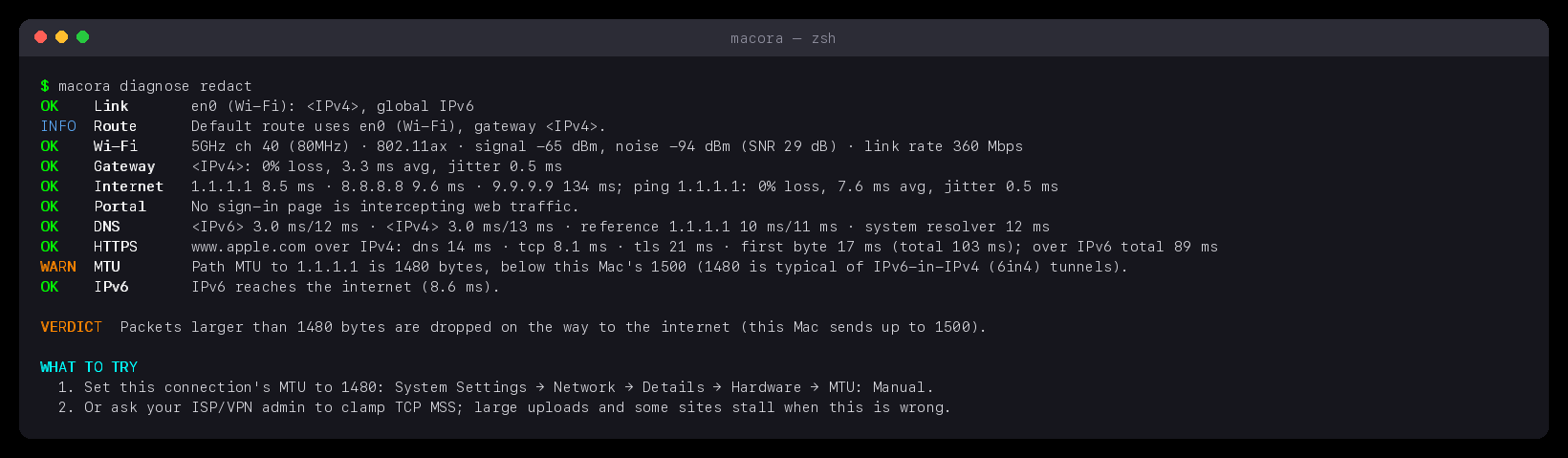
It works like ifconfig, with plain words: macora en0, macora list up, macora diagnose. Output below is real, with addresses masked by redact.
Download and install
Version 0.5.0 · macOS 14 or newer · Apple silicon · signed by Zyvor AI Labs and notarized by Apple, so it opens without a Gatekeeper warning.
Disk image (.dmg)
Open it and drag MACORA into Applications. Best for most people.
Installer (.pkg)
Double-click to install into Applications. Handy for managed Macs and scripts.
Install steps
- Download the
.dmgand open it. - Drag MACORA onto Applications, then open it from Launchpad or Spotlight.
- Choose Open if macOS asks to confirm an app downloaded from the internet. It is notarized, so there is no “unidentified developer” block.
- To look around without touching your network, start it with simulated data:
open -a MACORA --args --demo.
With Homebrew: brew install --cask zyvorai/tap/macora (the app and the macora command) or brew install zyvorai/tap/macora (command line only). If Homebrew says the tap is not trusted, run brew trust --cask zyvorai/tap/macora (or --formula for the CLI) and install again.
Verify a download: shasum -a 256 -c Macora-0.5.0.dmg.sha256. Uninstall: drag MACORA from Applications to the Trash. It runs no background service and leaves nothing else behind except its preferences. The CLI tarball is signed but not notarized, so if macOS blocks macora after download, run xattr -d com.apple.quarantine macora once.
Build from source
git clone https://github.com/zyvorai/zyvor-macora.git && cd zyvor-macora
./scripts/install-macos.sh ~/.local   # CLI, man page, completions
macora diagnose
macora tui
./scripts/build-macos.sh && open dist/Macora.app