Pods — inventory, logs and exec
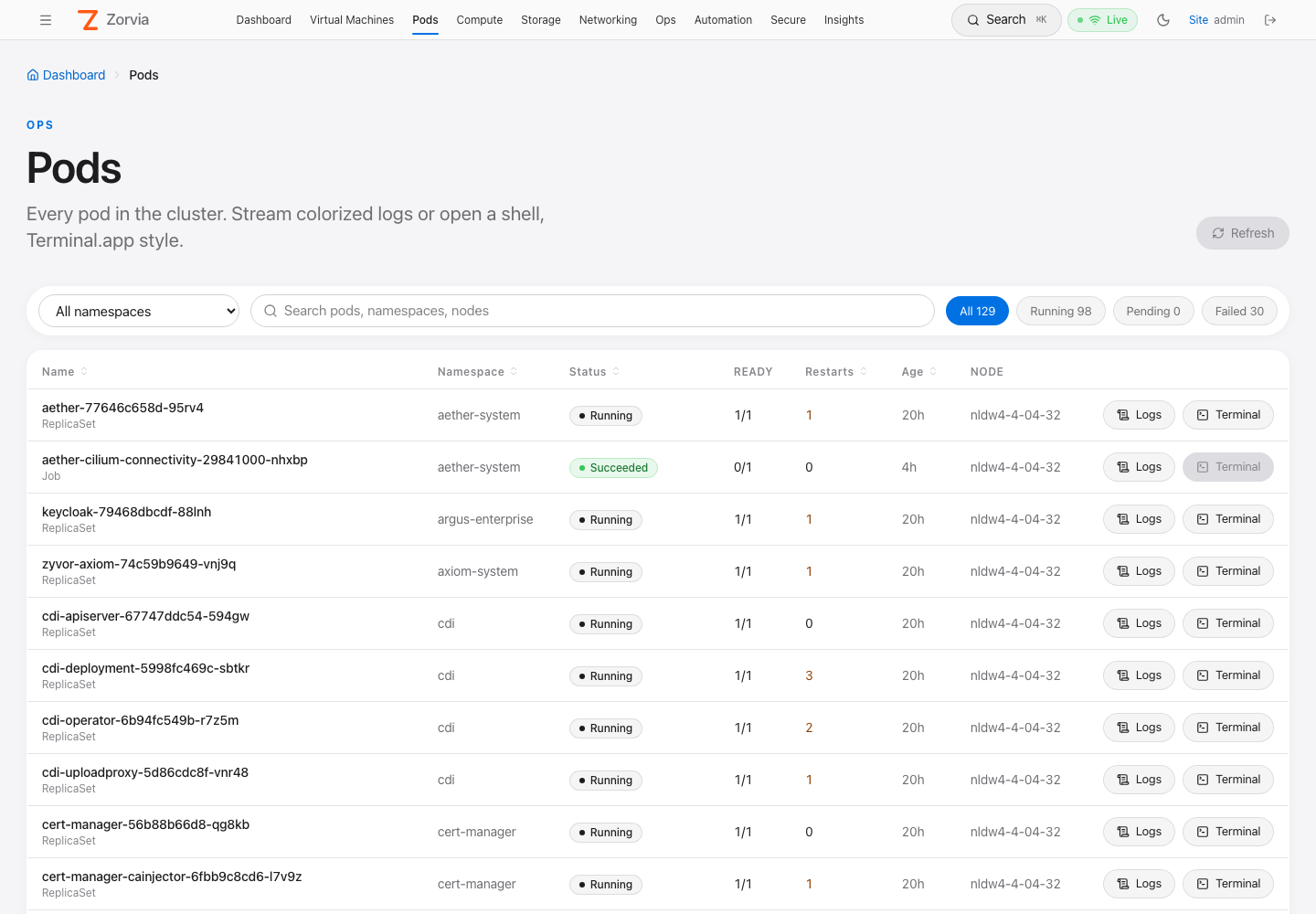
The Pods page lists every pod in the cluster and opens a macOS Terminal.app-style
panel with a live log stream, an interactive shell (kubectl exec -it), the pod's
events, or its YAML — right in the browser. Pods can be restarted (when a
controller owns them) or deleted, and logs can be popped out into their own browser
tab. It is admin-only end to end: the nav link, the SPA routes, the REST APIs and
both WebSockets all require the cluster.admin permission.
- Where to find it
- Pod list
- Logs panel
- Terminal (exec) panel
- Events and YAML panels
- Restart and delete
- Logs in a new tab
- HTTP API
- WebSocket protocol
- Security model
- Kubernetes RBAC
- Audit trail
- Troubleshooting
- Testing
- Implementation map
Where to find it
| Entry point | Notes |
|---|---|
| Top nav Pods (between Virtual Machines and Compute) | Hidden for user / viewer accounts |
https://<HOST>:30152/app/pods | Non-admins who open the URL directly see "Admins only." |
| Search ⌘K → "pods" | Command palette |
/app/pods/<ns>/<pod>/logs | Full-window logs for one pod (the panel's ↗ new-tab target) |
If the link is missing after an upgrade, hard-refresh the tab (⌘⇧R) — a tab opened before the deploy still runs the old bundle.
Pod list
| Feature | Behavior |
|---|---|
| Namespace filter | All namespaces (default) or any single namespace from GET /api/v1/namespaces |
| Search | Matches pod name, namespace and node |
| Status chips | All · Running · Pending · Failed with live counts. Succeeded/Completed and Terminating are shown in the list but not counted as Pending |
| Columns | Name (+ owner kind, e.g. ReplicaSet, Job), Namespace, Status, Ready (ready/total main containers), Restarts (highlighted when > 0), Age, Node |
| Status text | kubectl-style: a waiting/terminated reason on any main container (CrashLoopBackOff, ImagePullBackOff, Error, OOMKilled …) wins over the phase; a pod with a deletion timestamp shows Terminating |
| Refresh | Automatic every 10 s, plus the Refresh button in the header |
| Actions | Logs (any pod), Terminal (enabled only when the pod phase is Running), Restart ↻ (enabled only for controller-owned pods) and Delete 🗑 |
Clicking an action (or a row) opens the bottom panel:
- Logs / Terminal / Events / YAML chips switch view for the same pod.
- Header buttons: open logs in a new tab ↗, restart, delete.
- Drag the grip on the top edge to resize (default 460 px).
- Maximize fills the viewport; Esc restores.
- × closes the panel (the WebSocket closes with it).
Logs panel
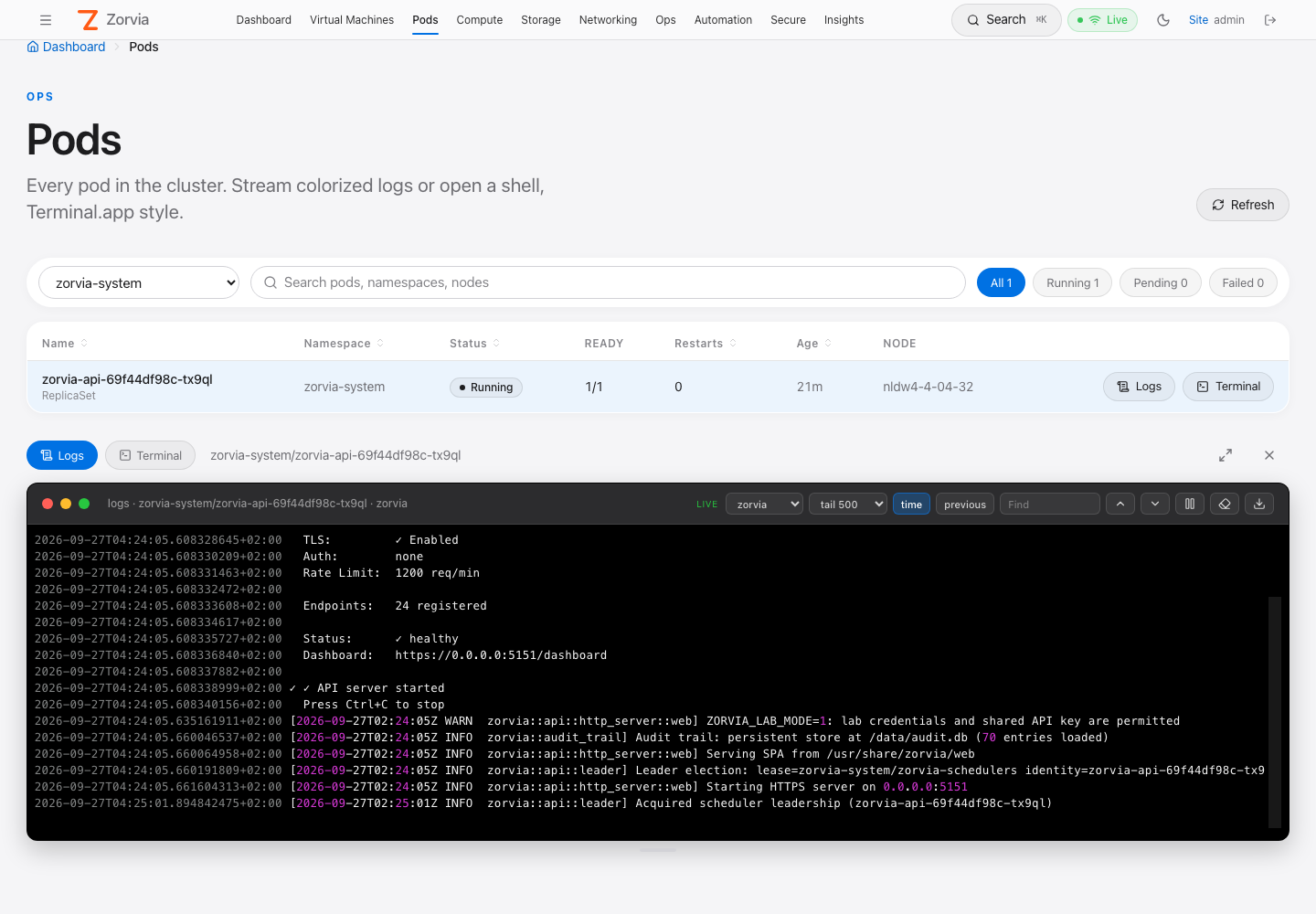
A read-only xterm.js terminal on a black Terminal.app "Pro" canvas (SF Mono 12.5 px, Terminal.app ANSI palette). Logs follow in real time.
Toolbar
| Control | What it does |
|---|---|
| LIVE badge | Stream connected |
| Container select | Shown for multi-container pods: main containers first, then init containers; defaults to the first main container |
tail 100 / 500 / 2000 | Lines of history to load before following (server clamps to 1–10 000) |
| time | Ask the kubelet to prefix each line with an RFC 3339 timestamp |
| previous | Logs of the previous (crashed) container instance |
| Find (↑ / ↓) | Incremental search through the scrollback |
| Pause / resume | Freeze the view; incoming lines are buffered and the count shown, then flushed on resume |
| Clear | Clear the screen (the stream keeps running) |
| Download | Save the buffer as <namespace>_<pod>_<container>.log |
| Reconnect | Re-open the stream |
Changing container, tail, time or previous reconnects automatically. The browser keeps the most recent 20 000 lines.
Colorizing
Lines are colored client-side (colorizeLogLine in web/src/components/terminalTheme.ts).
Lines that already contain ANSI escapes are passed through untouched.
| Pattern | Color |
|---|---|
Leading RFC 3339 timestamp, klog time (I0927 01:25:45.123) | dim grey |
ERROR / ERR / FATAL / PANIC / CRIT (and klog E / F) | bold red |
WARN / WARNING (klog W) | bold yellow |
INFO / NOTICE (klog I) | bold cyan |
DEBUG / TRACE | dim |
level=… / lvl=… / severity=… | key cyan, value by level |
key= in logfmt | cyan |
"quoted strings" | green |
HTTP methods (GET, POST, …) | bold blue |
| HTTP status codes (only on lines that look like HTTP) | 2xx green · 3xx cyan · 4xx yellow · 5xx bold red |
JSON lines ({…} / […]) | keys cyan · strings green · numbers magenta · true/false/null yellow · "level" values by level |
Server notices arrive pre-colored: red error: … if the stream cannot start or breaks,
grey [log stream ended] when the container exits.
Terminal (exec) panel
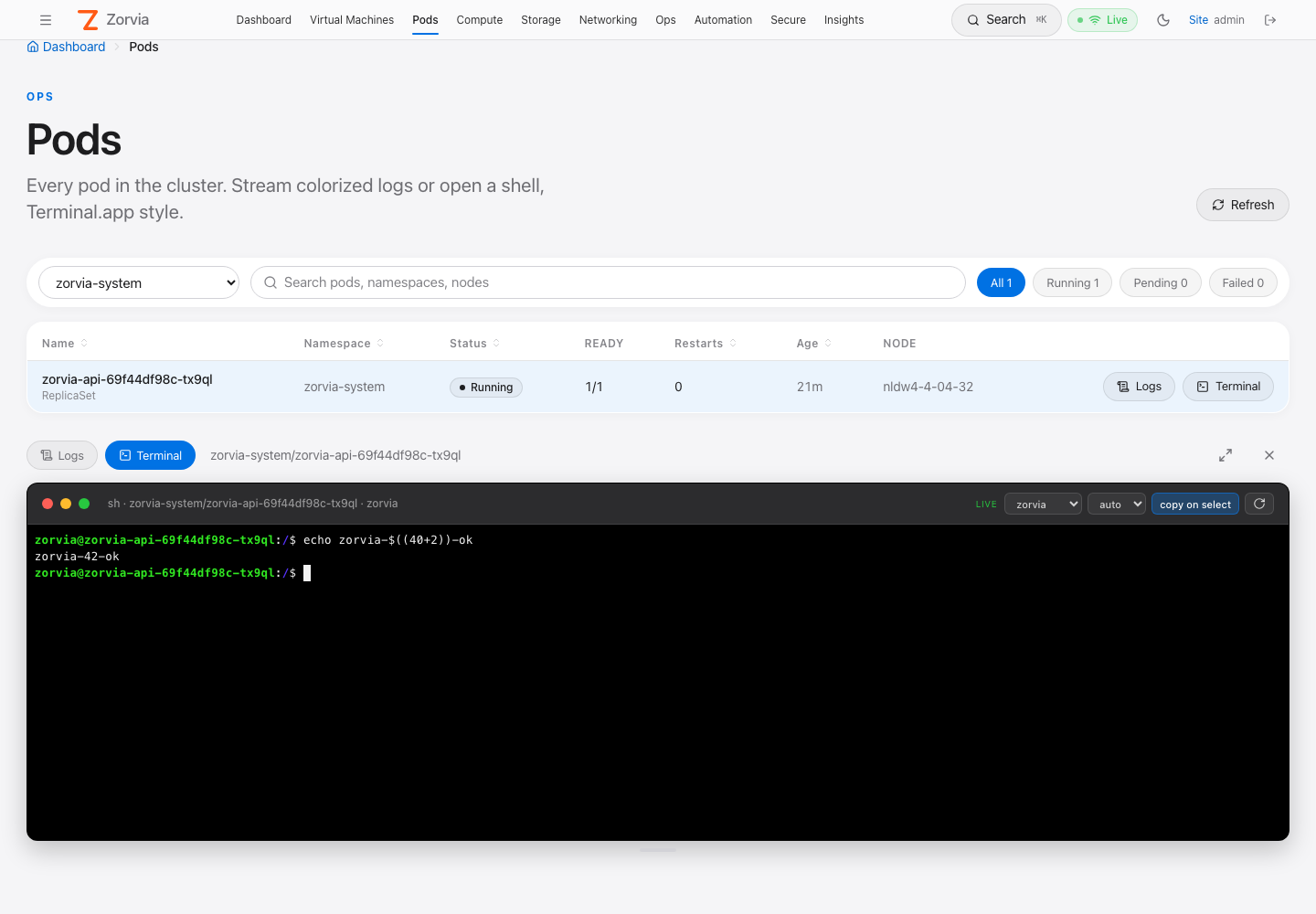
An interactive TTY into the pod — equivalent to kubectl exec -it <pod> -c <container> -- sh.
| Control | What it does |
|---|---|
| Container select | Same list as Logs (shown for multi-container pods) |
Shell auto / bash / sh | auto runs bash when present, otherwise sh |
| copy on select | Selecting text copies it to the clipboard (toggle) |
| Reconnect | Start a new session |
TERM=xterm-256coloris exported, sotop,vim,less, colors, and line editing work.- The terminal follows the panel size — resizing/maximizing sends a resize to the TTY.
- When the shell exits (
exit, Ctrl-D) you see a grey[process exited N]line; press Reconnect for a new session. - Distroless images without
/bin/shcannot be exec'd into — you'll get anerrormessage from the API (use Logs instead).
Events and YAML panels
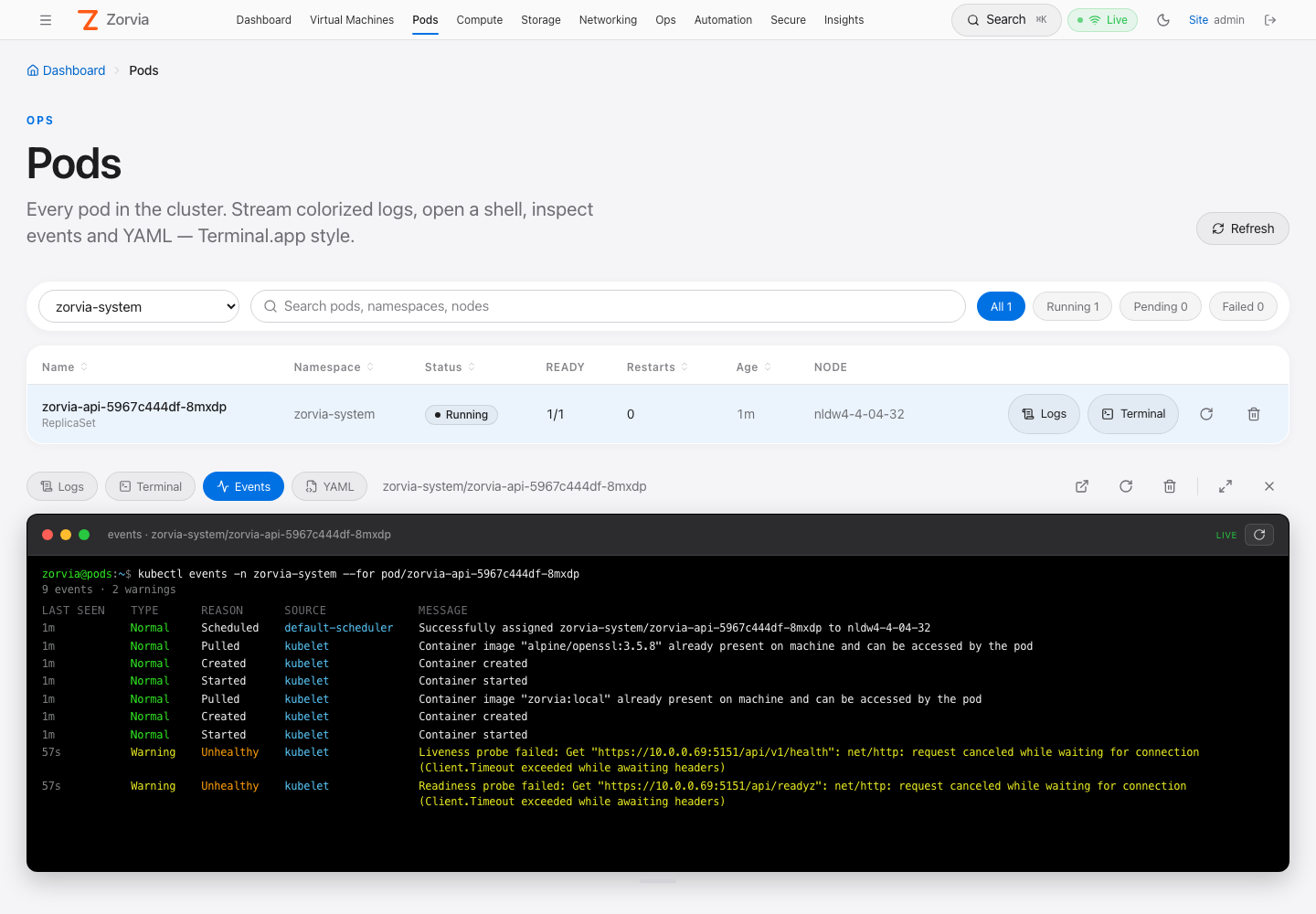
Events — equivalent to kubectl events -n <ns> --for pod/<pod>, refreshed every 5 s:
| Column | Rendering |
|---|---|
| LAST SEEN | Relative age, grey |
| TYPE | Normal green · Warning yellow |
| REASON | Bold (orange for warnings), ×N in magenta when the event repeated |
| SOURCE | Reporting component (kubelet, default-scheduler, …), blue |
| MESSAGE | Wrapped; yellow for warnings |
Kubernetes only keeps events for about an hour, so an old healthy pod often shows none.
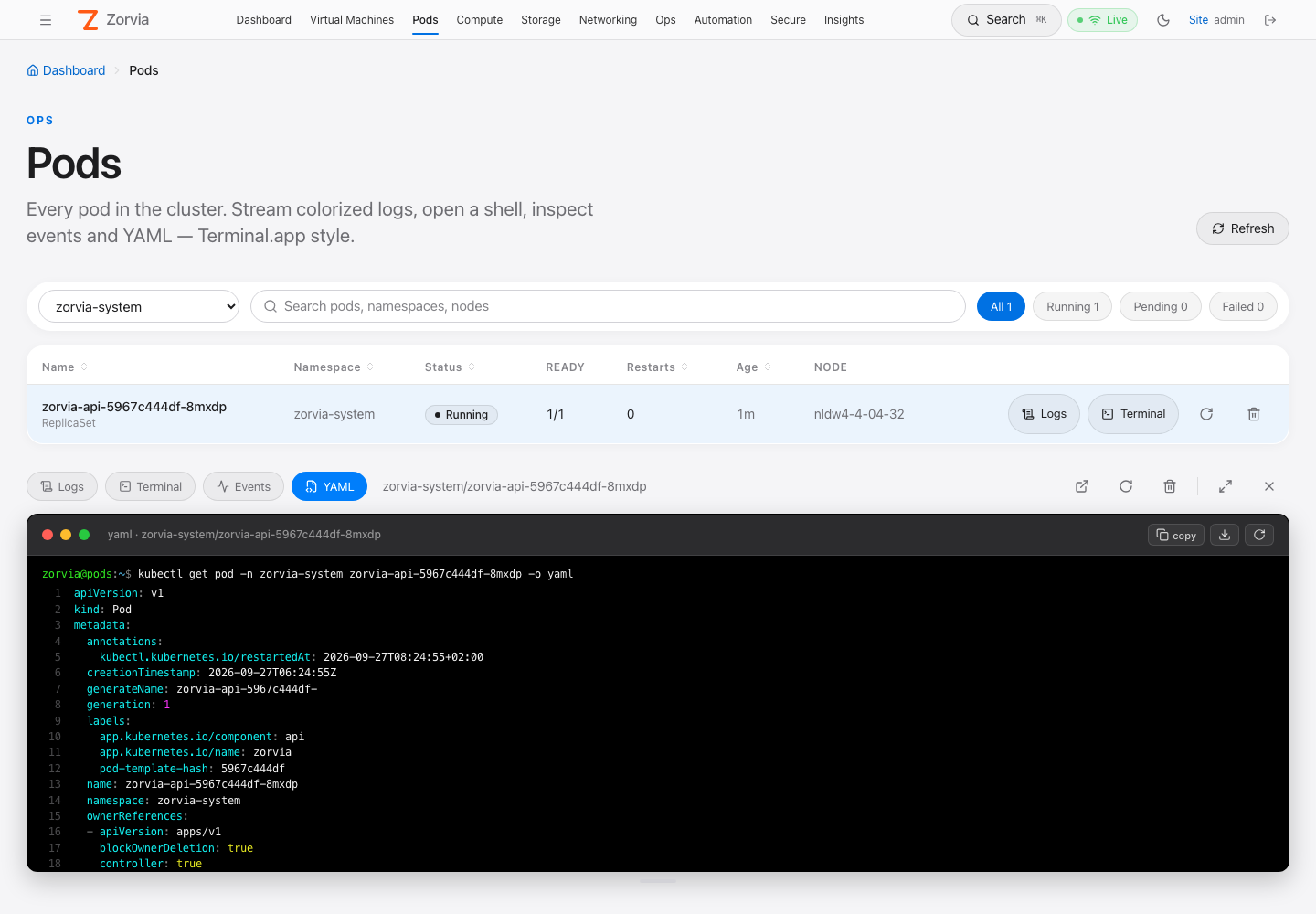
YAML — equivalent to kubectl get pod -n <ns> <pod> -o yaml, with managedFields
stripped for readability. Line numbers in the gutter; keys cyan, strings green, numbers
magenta, true/false/null yellow, comments and - markers grey (yamlLineSegments
in terminalTheme.ts). copy puts the YAML on the clipboard, download saves
<namespace>_<pod>.yaml, ↻ reloads.
Restart and delete
| Action | What happens | Enabled when |
|---|---|---|
| Restart | The pod is deleted; its controller schedules a fresh replacement (new name, same spec). Same effect as kubectl delete pod on a Deployment pod | Pod's controller owner is a ReplicaSet, StatefulSet, DaemonSet or ReplicationController |
| Delete | kubectl delete pod with the default grace period. Controller-owned pods come back; bare pods are gone for good | Always |
Both ask for confirmation. The dialog says whether the pod will come back ("Its
ReplicaSet will create a replacement") or not. Restart is refused server-side with
409 NOT_RESTARTABLE for anything else — notably KubeVirt virt-launcher pods
(owned by a VirtualMachineInstance: deleting one stops the VM rather than restarting it;
use the VM's own Restart) and Job pods.
If the pod you delete is open in the panel, the panel closes.
Logs in a new tab
The ↗ button in the panel header opens
/app/pods/<namespace>/<pod>/logs?container=<c> in a new browser tab: the same log
terminal filling the window, with a breadcrumb back to Pods. The URL is shareable
between admins; if the pod no longer exists (for example after a restart) the page says so.
HTTP API
All routes need a bearer token (JWT or scoped API token) with cluster.admin.
GET /api/v1/pods
| Query | Default | Notes |
|---|---|---|
namespace | all | Omit, empty, or all → every namespace; otherwise a DNS-1123 name |
curl -sk -H "Authorization: Bearer $TOKEN" \
  'https://HOST:30152/api/v1/pods?namespace=zorvia-system' | jq '.pods[0]'
{
  "name": "zorvia-api-fb7cd456b-c8vvj",
  "namespace": "zorvia-system",
  "phase": "Running",
  "status": "Running",
  "ready": "1/1",
  "restarts": 0,
  "created": "2026-09-27T01:52:10Z",
  "age_seconds": 1830,
  "node": "nldw4-4-04-32",
  "pod_ip": "10.42.0.117",
  "owner_kind": "ReplicaSet",
  "containers": [
    { "name": "zorvia", "image": "zorvia:local", "init": false, "ready": true, "restarts": 0, "state": "Running" }
  ]
}
Response envelope: { "pods": [...], "count": N }, sorted by namespace then name.
GET /api/v1/namespaces
{ "namespaces": ["cdi", "default", "kubevirt", "zorvia-system"] }
DELETE /api/v1/pods/{namespace}/{pod}
| Query | Default | Notes |
|---|---|---|
grace | pod's own | Grace period in seconds; 0 force-deletes |
{ "deleted": true, "namespace": "default", "name": "web-7d9c-abcde" }
POST /api/v1/pods/{namespace}/{pod}/restart
Deletes the pod only if a recreating controller owns it:
{ "restarted": true, "owner_kind": "ReplicaSet", "owner": "web-7d9c" }
GET /api/v1/pods/{namespace}/{pod}/events
{
  "events": [
    {
      "type": "Normal", "reason": "Pulled", "message": "Container image … already present",
      "count": 1, "source": "kubelet",
      "first_seen": "2026-09-27T05:12:01Z", "last_seen": "2026-09-27T05:12:01Z"
    }
  ]
}
Sorted oldest → newest by last_seen (falls back to eventTime for new-style events).
GET /api/v1/pods/{namespace}/{pod}/yaml
{ "yaml": "apiVersion: v1\nkind: Pod\nmetadata:\n name: …" }
GET /api/v1/pods/capabilities
What the Zorvia ServiceAccount may do to pods cluster-wide, from three
SelfSubjectAccessReviews (pods/log get, pods/exec create, pods delete):
{ "logs": true, "exec": true, "delete": false }
The page uses this to disable actions whose RBAC rule is missing — typically after
upgrading Zorvia without re-applying the ClusterRole — and shows a yellow notice naming
the missing rules. If the review itself fails, the capability reports true; the
Kubernetes call still enforces RBAC.
Errors
| Status | Code | When |
|---|---|---|
| 400 | INVALID | Namespace / pod is not a valid Kubernetes name |
| 401 | — | Missing / invalid / revoked token |
| 403 | — | Authenticated but not cluster.admin |
| 403 | FORBIDDEN | The ServiceAccount lacks the Kubernetes permission (e.g. pods delete) |
| 404 | NOT_FOUND | Pod does not exist |
| 409 | NOT_RESTARTABLE | Restart on a pod without a recreating controller |
| 500 | LIST_FAILED / KUBE_ERROR | Other Kubernetes API error (message sanitized) |
WebSocket protocol
Browsers cannot set Authorization on a WebSocket upgrade, so the token travels as
?token=. Both sockets validate the token and the cluster.admin permission
before upgrading (HTTP 401 / 403 otherwise), and reject non-DNS-1123 namespace, pod
or container names with 400.
Logs — GET /ws/pods/{namespace}/{pod}/logs
wss://<HOST>:30152/ws/pods/<ns>/<pod>/logs?token=<jwt>&container=<c>&tail=500×tamps=1&previous=0
| Query | Default | Notes |
|---|---|---|
token | — | Required |
container | pod default | Required by Kubernetes for multi-container pods |
tail | 500 | Clamped to 1–10 000 |
timestamps | off | 1 / true / yes |
previous | off | 1 / true / yes |
Server → client: one text frame per log line (always follow=true), plus a WebSocket
ping every 25 s to keep proxies from idling the connection out. Client → server: nothing
(close to stop).
Exec — GET /ws/pods/{namespace}/{pod}/exec
wss://<HOST>:30152/ws/pods/<ns>/<pod>/exec?token=<jwt>&container=<c>&shell=auto
| Query | Default | Notes |
|---|---|---|
token | — | Required |
container | pod default | |
shell | auto | auto, bash or sh — anything else behaves like auto |
The command is never user-supplied: the server always runs
/bin/sh -c "export TERM=xterm-256color; exec <bash|sh>".
| Direction | Frame | Payload |
|---|---|---|
| client → server | binary | Raw keystrokes → TTY stdin |
| client → server | text | {"type":"resize","cols":120,"rows":40} (clamped 2–1000) |
| server → client | binary | Raw TTY output (stdout + stderr) |
| server → client | text | {"type":"exit","code":0} when the shell exits (code may be null) |
| server → client | text | {"type":"error","message":"…"} if exec could not start |
Minimal client:
const ws = new WebSocket(`wss://${host}:30152/ws/pods/default/web-0/exec?token=${jwt}`)
ws.binaryType = 'arraybuffer'
ws.onmessage = (e) => typeof e.data === 'string'
  ? console.log('control', JSON.parse(e.data))
  : term.write(new Uint8Array(e.data))
term.onData((d) => ws.send(new TextEncoder().encode(d)))
term.onResize(({ cols, rows }) => ws.send(JSON.stringify({ type: 'resize', cols, rows })))
Security model
Exec into arbitrary pods — including kube-system and Zorvia itself — is a
cluster-admin-equivalent capability, so the feature is locked down accordingly:
- REST RBAC —
required_permissioninsrc/api/auth/permissions.rsmaps every/v1/pods*and/v1/namespaces*request (any method, including GET) toApiPermission::ClusterAdmin, ahead of the "reads are allowed" fallback. Unit test:pods_and_namespaces_require_cluster_admin. - WebSocket RBAC —
/ws/*routes sit outside the/apimiddleware, so the pod sockets callauthorize_permission(state, token, ApiPermission::ClusterAdmin)themselves (401 missing/invalid token, 403 insufficient permission). Session revocation (token_version) applies because tokens are resolved through the sameresolve_credentialpath as REST. - Input validation — namespace, pod and container names must be DNS-1123
(lowercase alphanumerics,
-,.; ≤ 253 chars), so nothing path-like reaches the Kubernetes URL. - Fixed argv — the exec command is chosen from three hard-coded launchers.
- Restart guard — restart only deletes pods whose controller recreates them;
virt-launcher(VM) and Job pods are refused with 409. - UI gating — nav link and routes are admin-only, destructive actions confirm first (UX only; the server is the enforcement point).
- Audit — every log view, exec start/end, restart and delete is recorded (below).
Tokens in the WebSocket query string can appear in reverse-proxy access logs; prefer
short-lived JWTs and scrub token= in any proxy in front of Zorvia.
Kubernetes RBAC
The zorvia ServiceAccount needs, in addition to its existing pods / events /
namespaces get-list access:
- apiGroups: [""]
  resources: ["pods"]
  verbs: ["delete"]          # Restart + Delete
- apiGroups: [""]
  resources: ["pods/log"]
  verbs: ["get"]
- apiGroups: [""]
  resources: ["pods/exec"]
  verbs: ["create", "get"]   # get: WebSocket upgrade; create: SPDY/v5 exec
These rules ship in deploy/k8s.yaml, deploy/k3s-zorvia-web.yaml and the Helm chart
(charts/zorvia/templates/rbac.yaml, both cluster-scoped and namespaced modes).
In namespaced mode the all-namespaces list needs cluster-scoped pods list; otherwise
pick a namespace the chart grants.
Existing installs — re-apply the manifest / helm upgrade, or patch the live role:
kubectl patch clusterrole zorvia --type=json -p='[
  {"op":"add","path":"/rules/-","value":{"apiGroups":[""],"resources":["pods"],"verbs":["delete"]}},
  {"op":"add","path":"/rules/-","value":{"apiGroups":[""],"resources":["pods/log"],"verbs":["get"]}},
  {"op":"add","path":"/rules/-","value":{"apiGroups":[""],"resources":["pods/exec"],"verbs":["create","get"]}}
]'

SA=system:serviceaccount:zorvia-system:zorvia
kubectl auth can-i delete pods --as=$SA -A                      # yes
kubectl auth can-i list events --as=$SA -A                      # yes
kubectl auth can-i get pods --subresource=log  --as=$SA -A      # yes
kubectl auth can-i create pods --subresource=exec --as=$SA -A   # yes
(kubectl auth can-i create pods/exec reports no even when granted — use --subresource.)
Without pods delete, Restart/Delete return 403 FORBIDDEN; everything else keeps working.
If you don't want pod deletion from the console at all, omit that rule.
Audit trail
| Event | action | Severity | resource_name | details |
|---|---|---|---|---|
| Log stream opened | view_logs | Info | <pod>/<container> | — |
| Exec started | exec | High | <pod>/<container> | {"shell":"auto","event":"start"} |
| Exec ended | exec | High | <pod>/<container> | {"shell":"auto","event":"end","exit_code":0,"duration_secs":42} |
| Exec failed to start | exec (success=false) | High | <pod>/<container> | {"shell":"auto","error":"…"} |
| Pod restarted | restart | Info | <pod> | {"owner_kind":"ReplicaSet","owner":"web-7d9c"} |
| Pod deleted | delete | Info | <pod> | {"grace":null} (success=false when Kubernetes refused) |
resource_type is pod, namespace is the pod namespace, user is the signed-in
username (api-token for token principals). Export for a SIEM:
curl -sk -H "Authorization: Bearer $TOKEN" \
  'https://HOST:30152/api/audit/export?format=jsonl&limit=200' | jq 'select(.action=="exec")'
Troubleshooting
| Symptom | Cause / fix |
|---|---|
| No Pods link | Not an admin, or stale tab — hard-refresh |
| "Could not load pods" 403 | Token lacks cluster.admin |
"Could not load pods" 500 forbidden | ServiceAccount missing pods list at cluster scope |
Logs: error: cannot stream logs … forbidden | Missing pods/log get — see Kubernetes RBAC |
Logs: a container name must be specified | Pick a container in the select |
Logs: previous terminated container … not found | Turn previous off (container never restarted) |
Terminal: error … forbidden | Missing pods/exec create/get |
Terminal: executable file not found | Image has no /bin/sh (distroless) |
| Terminal button disabled | Pod is not Running |
| Restart button disabled | No recreating controller (bare pod, Job, or KubeVirt virt-launcher) — use Delete, or the VM's Restart |
| Yellow "… unavailable" notice; Logs / Terminal / Restart / Delete greyed out | ServiceAccount missing the named rule (pods/log, pods/exec, pods delete) — re-apply the ClusterRole (UPGRADE.md); hover a button for the exact rule |
Restart / Delete: 403 FORBIDDEN | ServiceAccount missing pods delete |
| Events panel empty | Events expired (≈1 h retention) — normal for long-running healthy pods |
| New-tab logs: "Pod … was not found" | The pod was replaced (e.g. after Restart) — open the new pod from the list |
| Panel connects then drops after ~60 s behind a proxy | Proxy idle timeout; logs send pings every 25 s — raise the proxy timeout for exec sessions |
Testing
- Rust:
cargo test --features web --lib -- pod_handlers permissions::tests(name validation, fixed shell argv, resize control parsing, restartable owners, ClusterAdmin gate for every pods route and method). - Vitest:
web/src/components/terminalTheme.test.ts— log colorizer (levels, klog, logfmt, JSON, HTTP method/status, quoted request lines, ANSI passthrough, visible text unchanged) and the YAML tokenizer. - Lab e2e (
web/e2e/lab-pages.spec.ts):top nav links to pods— top-nav click lands on/app/podswith rows.pods: list, logs and exec— selectszorvia-system, opens Logs on a Runningzorvia-apipod and asserts streamed lines, then opens Terminal and runsecho zorvia-$((40+2))-ok, expectingzorvia-42-ok(proves real shell evaluation).pods: events, yaml, logs tab, delete confirm— Events shows thekubectl eventsprompt, YAML containskind: PodwithoutmanagedFields, ↗ opens a new tab on/app/pods/<ns>/<pod>/logswith streamed lines, Delete shows the "ReplicaSet will create a replacement" confirmation (cancelled — the lab API pod is never deleted).
cd web
ZORVIA_E2E_PASSWORD=… ZORVIA_E2E_BASE_URL=https://HOST:30152 PLAYWRIGHT_BASE_URL=https://HOST:30152 \
  npx playwright test e2e/lab-pages.spec.ts --project=chromium -g "pods"
Implementation map
| Layer | File |
|---|---|
| REST + WebSocket handlers | src/api/http_server/web/pod_handlers.rs |
| Route registration | src/api/http_server.rs (/v1/pods[/{ns}/{name}[/restart|events|yaml]], /v1/namespaces, /ws/pods/{ns}/{name}/logs|exec) |
| Permission gate | src/api/auth/permissions.rs, authorize_permission in ws_proxy_handlers.rs |
| Audit actions | src/audit_trail/mod.rs (Exec, ViewLogs, Restart, Delete) |
| API client | web/src/api/pods.ts |
| Pages | web/src/pages/Pods.tsx, web/src/pages/PodLogsPage.tsx (new-tab logs) |
| Panels | web/src/components/PodLogs.tsx, PodExec.tsx, PodEvents.tsx, PodYaml.tsx |
| Terminal.app theme, log colorizer, YAML tokenizer | web/src/components/terminalTheme.ts (+ terminalTheme.test.ts) |
| Styles | .zf-terminal-pro, .zf-term-* in web/src/styles/main.css |