The shape
You run the accounts and the phones. Keep runs the cells.
Keep stays a single-host building block. You run many hosts, put a gateway in front, and route each user to one.
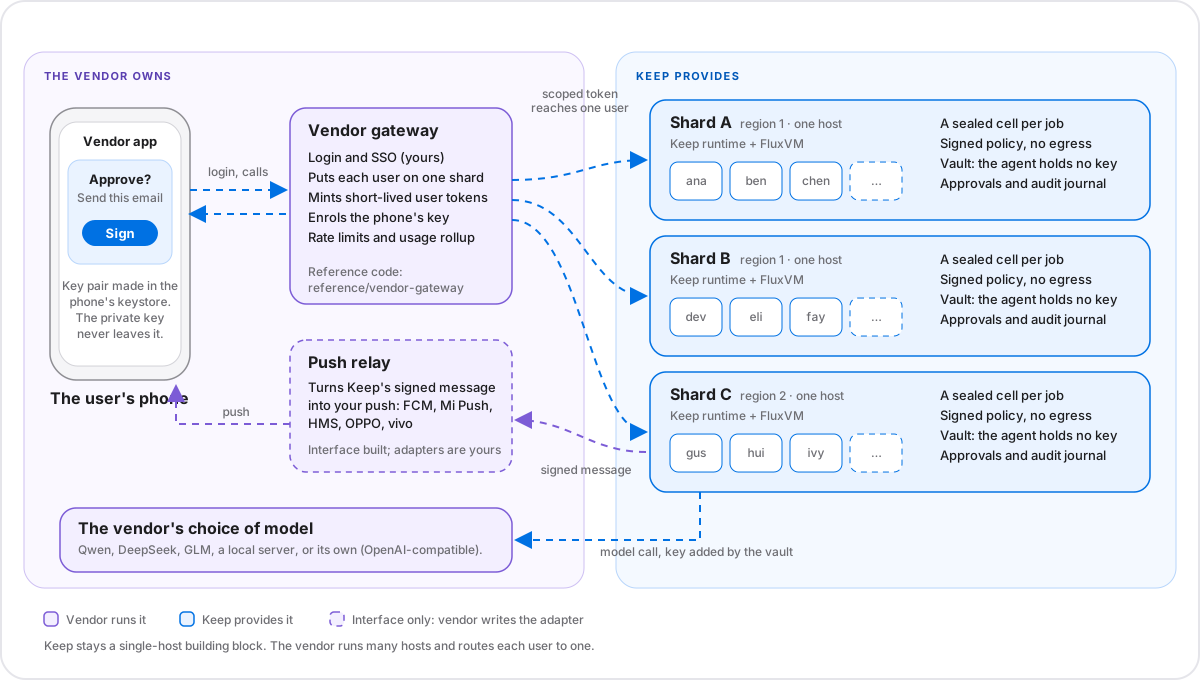
Who runs what
A clean line between your product and ours.
- The vendor owns
- Keep provides
- Accounts, login, step-upYour identity system, biometrics and second factor. Keep believes the user id the gateway puts in a token.
- Placement and regionsWhich shard a user lives on. A user is pinned to a region and never moved.
- Push deliveryKeep posts a signed message to a relay you run. You turn it into FCM, Mi Push, HMS, OPPO or vivo push.
- App, billing, model choiceThe UI, quotas policy, and which model answers: Qwen, DeepSeek, GLM, a local server or your own.
- A sealed cell per jobA microVM on hardware you control, with deny-by-default egress enforced on the host.
- Signed policy and vaultPolicy you can diff in git. The agent never holds an API key; keys are added on the host.
- Phone-signed approvalsApprovals only an enrolled phone key can sign, in a tamper-evident audit journal.
- Isolation, quotas, usageUser tokens that reach only one user’s data, per-user limits, and a usage report to bill from.
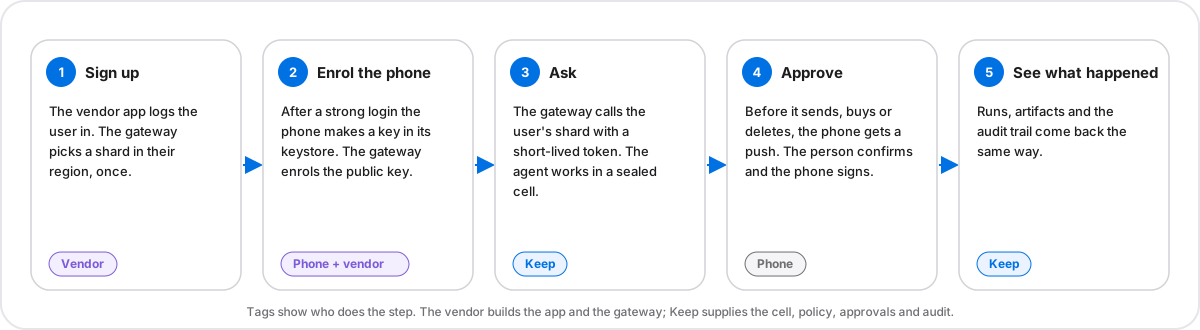
A user’s day
Five steps from sign-up to an approved action.
Pick a step to see what the phone shows and which call is made.
The vendor app logs the user in with the vendor’s own account system. The gateway picks a shard in the user’s region, once, and never moves them.
vendor login → gateway places the userMock-up of what a vendor’s app would show. Keep does not ship a phone app.
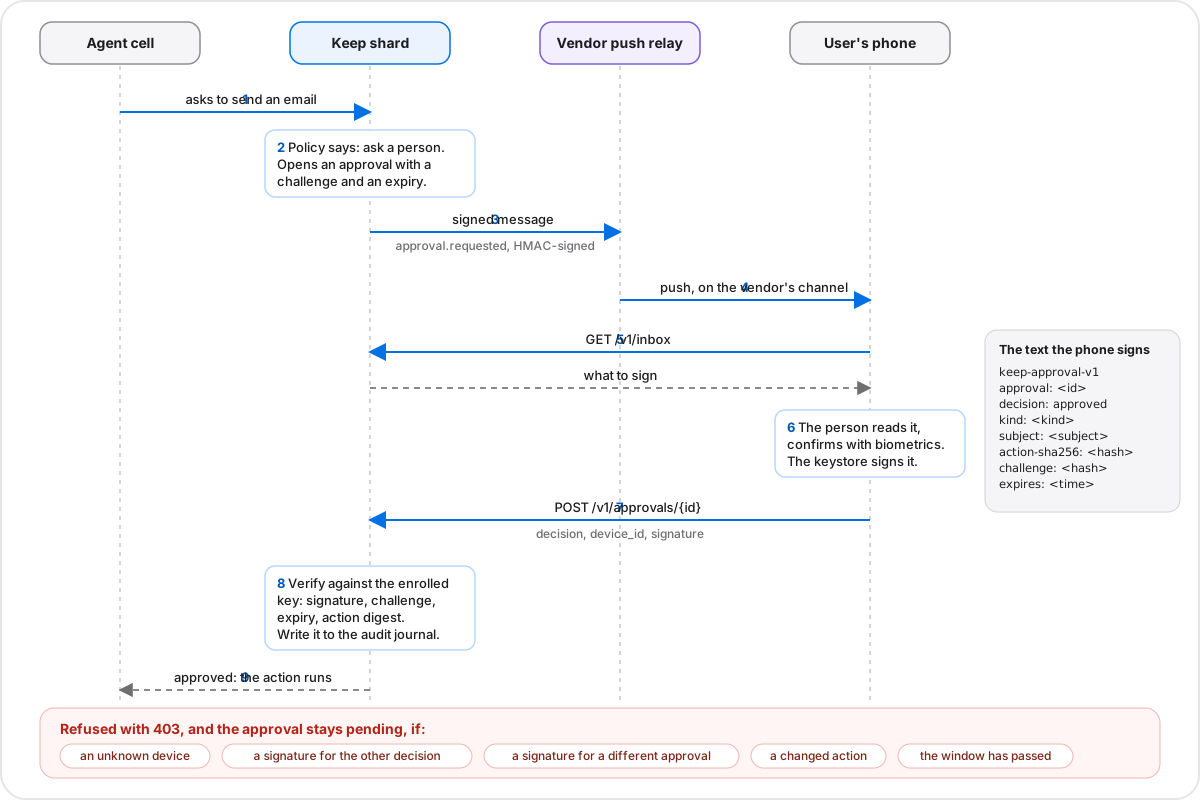
The approval handshake
The phone signs the exact decision. The shard checks.
A person’s ‘yes’ is a signature over a readable text: the approval, the decision, a digest of the planned action, and a challenge that expires.
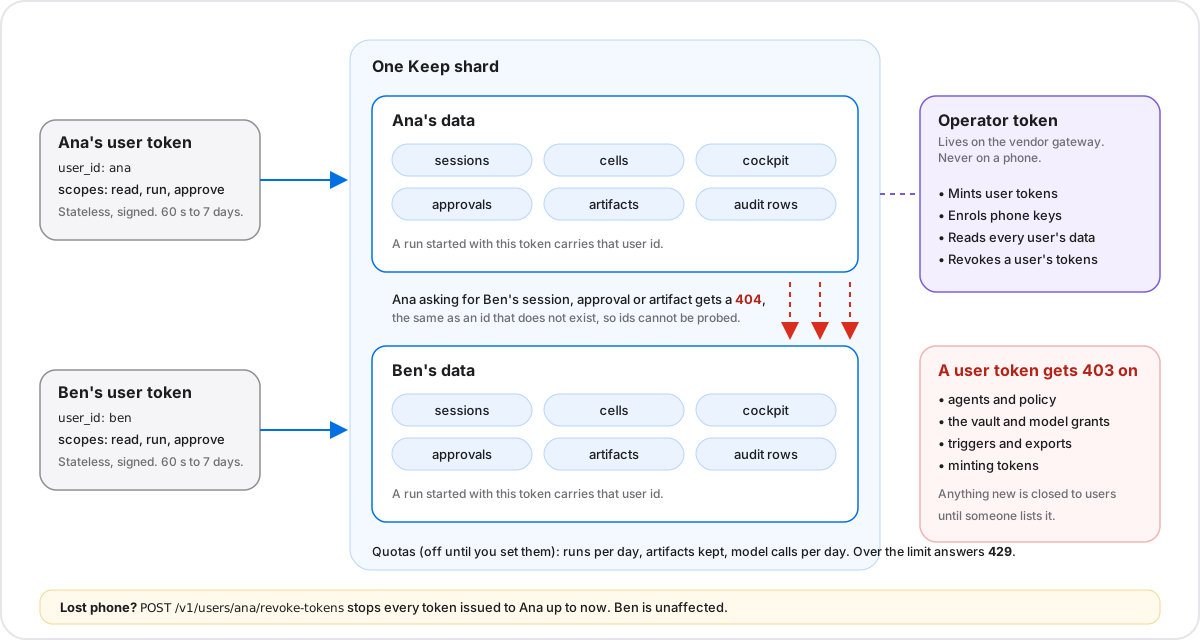
Many users, one shard
A user token reaches one person’s data. Nothing else.
Another user’s session, approval or artifact answers 404, the same as an id that does not exist. Operator routes are closed to users, and losing a phone means revoking its tokens.
What users can do
The files on a phone, turned into answers.
Ready-made use cases for what people export: chats, bank alerts, statements, calendars, contacts, booking and billing mail, receipts.
Share a file in the app→gateway posts it to POST /v1/demos/{use_case} with the user’s token→A sealed cell reads it→the summary comes back, with 0 outbound connections reported
- PackChat digest.txtYou drop in: An exported chatYou get: Who talks most, plans and times, open questions, money, links
- PackBank alerts ledger.txtYou drop in: Saved bank and card SMS alertsYou get: Money out and in, amounts, merchants, declined lines. One-time codes are not listed
- PackCard statement.csvYou drop in: A statement exportYou get: Most common categories and merchants, the first rows
- PackCalendar week.icsYou drop in: A calendar exportYou get: Events, start times, places, attendees
- PackContacts tidy-up.vcfYou drop in: A contacts exportYou get: Card count, names with duplicates first, numbers, emails
- PackTrip summary.eml.mboxYou drop in: A booking or boarding-pass emailYou get: Flights, stays, booking references, amounts
- PackWhat am I paying for?.mbox.emlYou drop in: A month of billing mailYou get: Renewals, trials ending, what will be charged, who charges
- PackReceipt and warranty.pdfYou drop in: A receipt or warranty PDFYou get: Totals, dates, warranty and return terms
- Built inPDF brief.pdfYou drop in: Any text PDFYou get: A one-page brief with headings and key lines
- Built inCSV clean-up.csvYou drop in: A messy CSVYou get: A cleaned file and a change summary
These are extractive: no model reads the file, and none reads photos or screenshots (Keep does no OCR). They handle sensitive files, and the evidence class is software-test, so the host’s operator could still read a cell’s memory. Details and how to copy one for your language: Phone-user packs.
Your model
Pick the model. The agent never holds the key.
Use any OpenAI-compatible endpoint. The host adds the credential after the vault says yes, so the cell never sees a real secret.
Endpoints and credential descriptors. Provider URLs there are marked to verify against the provider’s current docs.
Numbers
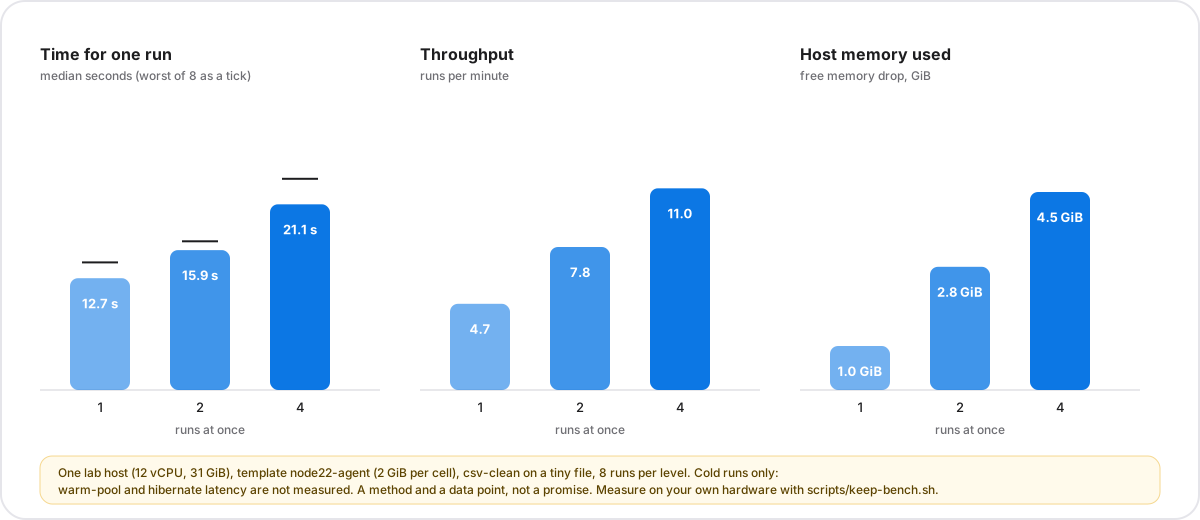
Measured once, on one host. Measure yours.
Cold runs took 13 to 21 seconds and got slower as more ran at once. That suits jobs, not a chat that must answer at once.
What exists
Built, reference, and not built.
Nothing here is drawn as working if it is not.
- Built and testedSealed cell, signed policy, vault, egress control, auditDeny-by-default egress on the host, a tamper-evident audit journal
- Built and testedMany users on one shard: tokens, isolation, quotas, usage, revocationTwo users in real cells, side by side, on the lab host
- Built and testedPhone-signed approvals and device enrolment (server side)Covered by unit and CI end-to-end tests. Not yet run with a waiting agent on the lab host
- Built and testedDocument use cases, triggers, batch, ready-made scenarios7 built-in use cases and scenario packs, run live
- Reference codeVendor gateway: login, placement, token minting, push relayReference code, tested; not a product
- Not builtAn Android appNot built. The guide has a signing sketch and test vectors to start from
- Not builtPush adapters for FCM, Mi Push, HMS, OPPO, vivoPlaceholders: each needs the vendor’s own credentials
- Not builtWarm-pool and hibernate latencyNot measured. Sessions report startup_ms so you can
- Not builtVault keys held by the phone’s secure chip; confidential cellsNot available. Hardware-gated (Keep 0.2). Evidence class stays software-test
What you can promise users
Say what is tested. Do not say what is not.
You can say
- Each user’s agent runs in a sealed cell with no network except what policy allows, and the cell reports how many outbound connections it made.
- The agent never holds an API key. Keys are added on the host, for hosts you list.
- A user’s token reaches only that user’s data; another user’s objects look like they do not exist.
- With signing required, an approval is accepted only if the user’s enrolled phone key signed that exact decision.
Do not say
- Not even we can read your data. The evidence class is software-test: the vendor’s operators can still read a cell’s memory and the host’s secrets. Confidential hardware is Keep 0.2 and not available.
- Your phone’s secure chip holds your vault. The phone key signs approvals; it does not unlock the vault.
- Compliant with any national or industry rule. Keep makes no compliance claim, in China or anywhere else.
- Your data never leaves the country, unless the shard, the model endpoint and the push path all stay there.
Start here
Read in this order.
- 1. Keep for a phone vendorThe blueprint, sizing, regions, claims, and questions for your counsel.
- 2. Many users on one KeepUser tokens, isolation, quotas, usage and revocation.
- 3. The phone sideEnrol a key, receive the push, sign, decide. Test vectors included.
- 4. Reference gatewayLogin, placement by region, token minting and a push relay, as tested reference code.
- 5. Choosing a modelQwen, DeepSeek, GLM, a local server or your own.
- 6. Keep itselfThe cell, policy, vault and audit that everything above stands on.
Honesty
What we don’t claim yet.
- Evidence class is software-test: the vendor’s operators can still read a cell’s memory and the secrets in the host environment. Confidential hardware with user-held keys is the goal of Keep 0.2 and is not available.
- Keep makes no compliance claim for any country or industry. Questions about data location, model licensing and content rules belong with your own counsel and security team.
- Meta’s Muse is described only as publicly reported. Corrections welcome.